Schlage Encode vs Encode Plus: Which Should You Choose? (November 2026)
Choose Schlage Encode Plus if you want Apple Home or Apple home key access. Choose Schlage Encode if Alexa, Google Home and standard app control cover your needs. Both are WiFi touchscreen deadbolts with remote access, auto-lock and built-in alarm features.
On this page (9 sections)
- Schlage Encode vs Encode Plus: what changes?
- Which Schlage Encode is best for Apple users?
- Which Schlage Encode is best for Alexa or Google Home?
- Do Encode and Encode Plus fit the same doors?
- Are the trims and finishes different?
- How do battery and backup entry work?
- Which lock works best with Ring and auto-lock?
- What if you need a different handle or cylinder?
- Schlage Encode vs Encode Plus: which should you choose?
Choose Schlage Encode Plus for Apple Home and Apple home key access. Choose standard Schlage Encode when Alexa, Google Home and Schlage Home app control are enough.
Both families are WiFi touchscreen deadbolts for households that want keyless entry, remote control and a more flexible way to manage a front or back door. They connect through the Schlage Home app and a secure home WiFi network, so you can lock or open the door remotely, view lock history and receive customizable notifications without buying an extra hub for the WiFi connection described here.
The main difference is the smart-home system each family supports. Encode Plus works with Apple Home and Apple home keys, allowing a paired iPhone or Apple Watch to be tapped for locking or opening.
It also works with Amazon Alexa and Google Assistant. Standard Encode supports Alexa and Google Home through the Schlage Home app and a voice-enabled device, but the supplied product information does not include Apple Home or Apple home key support.
That makes the decision fairly practical. An Apple household that already uses Apple Home or wants phone and watch tap access has a clear reason to choose Encode Plus.
A household built around Alexa or Google Home may have everything it needs with standard Encode, especially if app control, touchscreen entry and remote notifications matter more than Apple integration.
The access-code limit is another difference to check before choosing. The standard Encode models listed here support up to 100 access codes.
The aged bronze Encode Plus supports up to 250, while the satin nickel Encode Plus supports up to 100. The larger limit may suit a home that needs separate codes for many family members, guests or service providers, while a smaller household may never notice the difference.
All four options include touchscreen entry, built-in WiFi, secure encrypted connections and a customizable alarm for door movement and forced entry attempts. They also provide auto-lock with selectable time delays, and each product is designed for standard doors from 1-3/8 inches to 1-3/4 inches thick with a 2-3/8-inch or 2-3/4-inch backset.
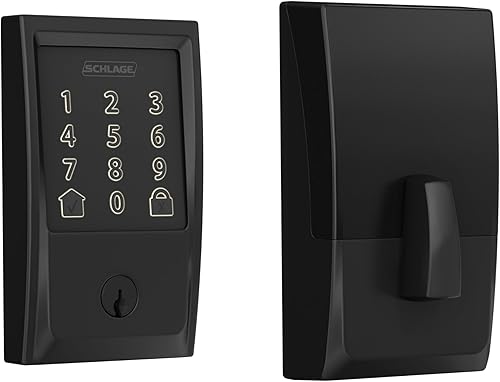
The physical choice is not identical across the group. Standard Encode is available here with Century trim in Matte Black or Camelot trim in Aged Bronze.
Encode Plus uses Camelot trim in either Aged Bronze or Satin Nickel. Compare the trim and finish with the hardware already around your door, then confirm whether your preferred access method and code limit match the way your household will use the lock.
 Best for Alexa and Google homes
Schlage Encode Smart WiFi Deadbolt Lock

Schlage Encode vs Encode Plus: what changes?
Encode Plus adds Apple Home and Apple home keys, while standard Encode focuses on Schlage Home, Alexa and Google Home. Both product families include built-in WiFi, encrypted connections, touchscreen entry, remote control and customizable notifications.
The standard Schlage Encode options support up to 100 access codes. The aged bronze Encode Plus supports up to 250 access codes, while the satin nickel Encode Plus supports up to 100.
That difference matters if you manage access for family members, guests or service providers. If you only need a few codes, the larger limit may not change your daily experience.
Both families include a built-in alarm for door movement and forced entry attempts. They also offer auto-lock with selectable time delays and a one-touch locking option from the exterior touchscreen.
For a broader look at choosing a door deadbolt, consider the door thickness, backset, trim style and access method before comparing smart features.
Which Schlage Encode is best for Apple users?
The aged bronze Encode Plus is the strongest fit when Apple home keys and a larger access-code limit matter. It works with Apple Home, Apple home keys, Alexa and Google Home, and it supports up to 250 access codes.
The Encode Plus aged bronze model has Camelot trim and a 2.4 GHz WiFi requirement in its product information. It uses the Schlage Home app for remote control and monitoring, with no additional accessory or hub needed.
Apple home keys can make entry feel more direct because you can tap an iPhone or Apple Watch to lock or open. That feature is the clearest reason to choose Encode Plus over standard Encode.
The satin nickel Encode Plus also works with Apple Home and Apple home keys. Its listed access-code limit is up to 100, so it suits Apple households that do not need the larger limit.
Read our Schlage Encode Plus review for a closer look at the Plus model and its Apple-focused access options.
Which Schlage Encode is best for Alexa or Google Home?
The standard Encode is the better match when your smart home uses Alexa or Google Home without Apple home keys. Both standard Encode products support voice control through the Schlage Home app and a voice-enabled device.
The Matte Black Encode uses Century trim and supports up to 100 access codes. It also includes a fingerprint-resistant touchscreen, a built-in alarm and remote control through the Schlage Home app when connected to secure home WiFi.
The aged bronze standard Encode uses Camelot trim and also supports up to 100 access codes. Its main difference from the Matte Black option is the exterior style and finish.
The standard Encode options listed here do not include the Apple Home and Apple home key support described for Encode Plus. That makes the choice simple for households already committed to Alexa or Google Home.
If you are considering Z-Wave instead of WiFi, see whether Schlage Encode works with Z-Wave before choosing a hub-based setup.
Do Encode and Encode Plus fit the same doors?
The products here fit standard doors from 1-3/8 in to 1-3/4 in thick with a 2-3/8 in or 2-3/4 in backset. Each is designed for installation with a screwdriver and does not need hardwiring.
Measure the door before ordering. Check thickness, backset and the existing deadbolt opening, then compare the trim shape with nearby door hardware.
The Snap ‘n Stay design helps hold the lock on the door during installation. Installation hardware and instructions are included with each product listed here.
A smart deadbolt can control access only after the mechanical installation is correct. If the bolt rubs, the door does not close fully or the touchscreen sits unevenly, correct the door alignment before relying on auto-lock.
For matching hardware, see the guide to the best Schlage Encode with knob, then compare best Schlage Encode handleset options if you want to change the exterior entry set.
Are the trims and finishes different?
Choose the trim and finish that match your door hardware, because the smart functions do not remove the visual difference between Century and Camelot styles. The standard Encode options here include Century Matte Black and Camelot Aged Bronze.
Encode Plus options include Camelot Aged Bronze and Camelot Satin Nickel.
Century and Camelot create different exterior looks around the touchscreen. The product names identify the trim, so use the exact model name when comparing replacement hardware.
The four locks use zinc construction and measure 0.9 x 3 x 5 inches. Their finishes and trim names are more useful for visual matching than the product family name alone.
See Schlage Encode styles and finishes for a finish-focused comparison. If you are replacing the handle around the lock, review which door handles fit a Schlage Encode lock.
How do battery and backup entry work?
All four products use battery power, so plan for battery checks and keep the physical backup key available. The standard Encode models use 4 AA batteries, include those batteries and provide low-battery alerts on the touchscreen and in the Schlage Home app.
The standard Encode information gives up to 6 months of battery life with typical use. Battery life depends on use patterns, so treat the low-battery indicator as a prompt to replace the batteries rather than waiting for the lock to stop responding.
The standard Encode options include 1 physical backup key. The Encode Plus product information here focuses on touchscreen, app and Apple home key access, so keep the exact backup-entry details in mind when comparing the model you plan to buy.
Use the guide to the best batteries for Schlage Encode for replacement planning. If the lock is going onto a thick door, check the Schlage Encode thick door kit for BE489 before installation.
Which lock works best with Ring and auto-lock?
Standard Encode is a strong fit if Ring and Schlage Home app control are central to your routine, while both families offer auto-lock settings. The standard Encode product information identifies Ring compatibility and includes remote control through the Schlage Home app when the lock is connected to secure home WiFi.
Auto-lock gives you a choice about how the lock fits into your daily habits. You can select a time delay so the door relocks after you leave, or turn the feature off completely if you prefer to lock the door manually.
A shorter delay may suit a home where the door should secure itself soon after closing, while a longer delay can be more comfortable when people are moving in and out.
The one-touch locking option also helps when leaving. Pressing the exterior touchscreen can lock the door without needing to open the app, while the app remains useful when you want remote access, notifications or lock history.
Voice control is available with Alexa and Google Home when paired with the Schlage Home app and a voice-enabled device.
Auto-lock is most useful when the mechanical side of the installation is already working correctly. Confirm that the door closes fully, the bolt moves without rubbing and the touchscreen sits properly before relying on a delay.
For setup details, read how to connect Schlage Encode to Ring and how to set up auto-lock on a Schlage Encode.
What if you need a different handle or cylinder?
Choose compatible hardware by checking the exact Encode model, trim and door setup before replacing a handle or cylinder. The lock family name alone may not answer every fit question, because the products listed here use different trim styles and finishes even when their smart-lock functions are similar.
Start with the door itself. Check the thickness, the deadbolt opening and the position of the existing handle before choosing replacement hardware.
The listed Encode and Encode Plus models fit standard doors from 1-3/8 inches to 1-3/4 inches thick and use either a 2-3/8-inch or 2-3/4-inch backset, but surrounding hardware still needs to sit comfortably beside the touchscreen and deadbolt.
A handle change can alter the appearance of the entry area and may affect the clearance around the lock. Standard Encode appears here with Century Matte Black or Camelot Aged Bronze, while Encode Plus uses Camelot Aged Bronze or Camelot Satin Nickel.
Matching the new handle to the lock trim and finish can make the installation look more consistent.
If the handle is loose, worn or visually dated, compare the replacement with the existing mounting area before removing anything. Keep the deadbolt position in mind as well, since a new handle should not crowd the lock or make the door harder to operate.
The supplied product information identifies the locks as zinc units, but it does not establish that every handle or cylinder will fit every door arrangement.
A cylinder question is separate from choosing a handle. If the key mechanism needs attention, identify the exact model and confirm the replacement steps for that version before beginning.
This is especially important when comparing standard Encode with Encode Plus, since the product names, trim options and model numbers differ.
For handle guidance, see which door handles fit a Schlage Encode lock and best handlesets for Schlage Encode locks. If the lock cylinder is the part that needs attention, use the guide to replace a Schlage Encode lock cylinder.
Check the door measurements and the exact lock model first so the replacement supports the existing installation rather than creating a new fit problem.
Schlage Encode vs Encode Plus: which should you choose?
Pick Schlage Encode Plus if you use Apple Home, Apple home keys or need up to 250 access codes in the aged bronze model. Pick standard Schlage Encode if Alexa, Google Home, Ring and Schlage Home app control cover your needs.
Choose the Matte Black Century Encode for a dark finish and Alexa or Google Home control. Choose the aged bronze Camelot Encode when that trim and finish suit the door.
Choose the aged bronze Encode Plus for Apple access plus the larger stated access-code limit. Choose the satin nickel Encode Plus for Apple access when the finish is the deciding factor.
For readers who want a broader product view, our Schlage Encode Smart WiFi deadbolt reviews can help you compare the standard family. The right answer in this Schlage Encode vs Encode Plus choice is the model that fits your smart-home ecosystem, door measurements and preferred finish.
Frequently asked questions
What is the main difference between Schlage Encode and Encode Plus?
Schlage Encode Plus adds Apple Home and Apple home key support, so you can tap an iPhone or Apple Watch to lock or open when paired with Apple Home. Both families offer built-in WiFi, Schlage Home app control, touchscreen entry, remote management, access codes, notifications, auto-lock and a built-in alarm.
Is Schlage Encode Plus worth it over Encode?
Encode Plus is worth choosing when Apple Home or Apple home keys are part of your daily routine. If you use Alexa, Google Home and the Schlage Home app, the standard Encode covers those needs.
Compare the exact trim and finish too, since the four options here are not the same exterior style.
Can Schlage Encode and Encode Plus work with Alexa?
Yes. The Encode options here work with Amazon Alexa when paired with the Schlage Home app and a voice-enabled device.
Encode Plus also works with Apple Home and Apple home keys, while the standard Encode options listed here focus on Alexa, Google Home and Schlage app access.
How many access codes can Schlage Encode use?
The standard Encode products here support up to 100 access codes. Encode Plus varies by option in the supplied product information: the aged bronze model supports up to 250, while the satin nickel model supports up to 100.
Check the exact model before choosing it for a larger access-code list.
Do Schlage Encode and Encode Plus need a hub?
No extra accessory or hub is needed for the WiFi control described for these models. They connect to your home WiFi through the Schlage Home app.
The Encode Plus aged bronze information specifies a 2.4 GHz home WiFi connection, so check your network setup before installation.