Schlage Encode Smart WiFi Deadbolt Review: Worth It? (November 2026)
The Schlage Encode Smart WiFi Deadbolt is a strong choice for connected front-door access because it combines built-in WiFi, keypad entry, remote control and up to 100 access codes. Choose among these versions by trim and finish.
On this page (10 sections)
- Is the Schlage Encode Smart WiFi Deadbolt a good choice?
- What does the standard Encode include?
- Schlage Encode Smart WiFi Deadbolt Lock with Century Trim, Matte Black
- Schlage Encode Smart WiFi Deadbolt Lock with Camelot Trim, Aged Bronze
- Schlage Encode Smart WiFi Deadbolt Lock with Century Trim, Satin Nickel
- How does Schlage Encode connect to your home?
- What should you check before installing Schlage Encode?
- Is the Schlage Encode secure enough for a front door?
- How should you choose among these three Encode versions?
- Schlage Encode Smart WiFi Deadbolt review verdict
The Schlage Encode Smart WiFi Deadbolt is a capable connected front-door lock for households that want keypad entry, remote app control and up to 100 access codes.
These three versions share the core Encode design, so your main choice is the trim and finish that suit your door. The daily experience is consistent across the range, with the same approach to locking, opening, code management and notifications in each version.
The difference is mainly visual, which makes matching the lock to the rest of the entry set a practical step. The standard Encode is also a useful alternative to a traditional key-only door deadbolt when you want access management without adding a separate WiFi hub.
Built-in WiFi is a key part of that appeal, since remote access does not depend on an extra accessory. When paired with the Schlage Home app and a secure home network, you can lock and open the door from elsewhere.
You can also view lock history and receive customizable notifications about lock activity. That record can help you check whether a family member arrived home or whether a guest code was used.
Keypad entry suits people who carry no keys or who come and go with hands full. A physical backup key is included, so the lock does not leave you with only one way in.
Auto-lock can relock the door after a delay, or you can turn it off for manual control. That flexibility suits busy entries where people may be carrying in shopping or supervising children.
The lock runs on four AA batteries, with a low-battery indicator on the touchscreen and in the app. It also fits standard doors within the stated thickness and backset ranges, which simplifies planning.
Before choosing, check those door measurements and the strength of WiFi coverage near the entry.
Is the Schlage Encode Smart WiFi Deadbolt a good choice?
The Schlage Encode is a strong match for connected front-door access with built-in WiFi. It lets you lock and open remotely through the Schlage Home app, manage access codes, view lock history and receive customizable notifications when paired with the app and a secure WiFi network.
The keypad supports keyless entry, while a physical backup key provides another way to enter. Auto-lock can relock the door after a chosen delay, or you can turn the feature off if you prefer to lock manually.
This is the standard Encode family, not the Encode Plus model. See the Schlage Encode Plus review for the related model.
Compare the Schlage Encode vs Encode Plus if Apple Home Key or the differences between the two product lines matter to your setup.
What does the standard Encode include?
The standard Encode combines a touchscreen keypad, built-in WiFi and battery power in a deadbolt designed for standard doors. The three versions reviewed here fit doors from 1-3/8 in to 1-3/4 in thick with a 2-3/8 in or 2-3/4 in backset.
Each version includes installation hardware, installation instructions, four AA batteries and one physical backup key. Schlage lists a zinc material for the matte black and aged bronze versions, while the satin nickel version lists nickel as its material type.
The lock is designed for screwdriver installation without hardwiring. Its Snap ‘n Stay design is intended to help hold the lock on the door while you work, leaving both hands available during setup.
Check your door thickness and backset before ordering. A smart lock can have the right functions and still be a poor fit if the existing door preparation does not match.
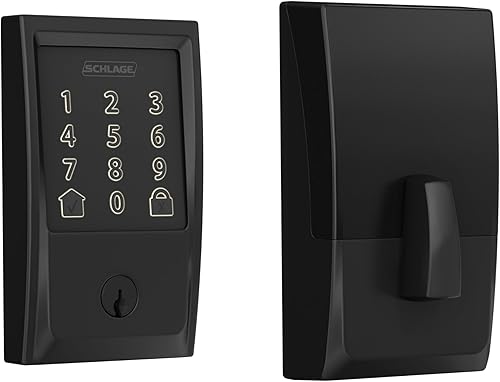
Schlage Encode Smart WiFi Deadbolt Lock with Century Trim, Matte Black
The matte black Century Trim version is the highest-scoring choice here for a dark, simple front-door style and broad connected access features.
Schlage Encode Smart WiFi Deadbolt Lock: Best for matte black entry doors
- Century Trim
- Matte Black finish
- Built-in WiFi
- Up to 100 access codes
- Four AA batteries included
The Century Trim version combines built-in WiFi, keypad entry, remote app control and a matte black finish. It suits households that want remote access and a dark, simple front-door look.
Pros
- Built-in WiFi
- Up to 100 access codes
- Custom notifications and lock history
- Four AA batteries included
- Physical backup key included
Cons
- Requires four AA batteries
- Remote features depend on home WiFi and the Schlage Home app
- Matte black may not suit every entry set
This model supports Bluetooth and WiFi connectivity, with control through the Schlage Home app and optional voice control through Amazon Alexa or Google Home when paired with the app and a voice-enabled device. Its touchscreen is fingerprint-resistant, and the built-in alarm can be customized for door movement and forced-entry attempts.
The Century Trim gives the lock a clean, modern look. If you want to coordinate the lock with a matching knob, review the best Schlage Encode with knob options before choosing the rest of the entry hardware.
The lock uses four AA batteries and has typical battery life of up to six months. The touchscreen and Schlage Home app provide low-battery notices, which gives you time to replace the batteries before access becomes inconvenient.
Schlage Encode Smart WiFi Deadbolt Lock with Camelot Trim, Aged Bronze
The aged bronze Camelot version is the best visual fit for traditional bronze entry hardware while keeping the standard Encode access features.
Schlage Encode Smart WiFi Deadbolt Lock: Best for aged bronze style

- Camelot Trim
- Aged Bronze finish
- Built-in WiFi
- Up to 100 access codes
- Four AA batteries included
This Camelot Trim version offers the same core connected access features in an aged bronze finish. It is the better visual match for a traditional entry door or bronze hardware.
Pros
- Built-in WiFi
- Up to 100 access codes
- Custom notifications and lock history
- Auto-lock with adjustable delays
- Physical backup key included
Cons
- Requires four AA batteries
- Remote features depend on home WiFi and the Schlage Home app
- Aged bronze is a style-specific finish
It supports remote lock and open control through the Schlage Home app, up to 100 access codes, lock history and customizable notifications. Amazon Alexa and Google Assistant can provide optional voice control when the lock is paired with the Schlage Home app and a voice-enabled device.
The Camelot Trim changes the appearance rather than the core access plan. Its aged bronze finish may blend better with an existing traditional entry set than matte black or satin nickel.
The model uses WiFi connectivity and runs on four included AA batteries. It also includes auto-lock with adjustable time delays, one-touch locking from the exterior touchscreen and a physical backup key.
Schlage Encode Smart WiFi Deadbolt Lock with Century Trim, Satin Nickel
The satin nickel Century Trim version is the practical pick for lighter door hardware and a brushed metal look.
Schlage Encode Smart WiFi Deadbolt Lock: Best for satin nickel hardware

- Century Trim
- Satin Nickel finish
- Built-in WiFi
- Up to 100 access codes
- Four AA batteries included
The satin nickel Century version keeps the Encode feature set while matching lighter, brushed-looking door hardware. Choose it when finish coordination matters as much as connected access.
Pros
- Built-in WiFi
- Up to 100 access codes
- Custom notifications and lock history
- Auto-lock with adjustable delays
- Physical backup key included
Cons
- Requires four AA batteries
- Remote features depend on home WiFi and the Schlage Home app
- Satin nickel can show a different look from other metal finishes
This Encode supports built-in WiFi, app control, keypad entry and optional voice control through Amazon Alexa and Google Assistant. You can manage up to 100 access codes, review lock history and set customizable notifications through the Schlage Home app.
Its Century Trim matches the shape used by the matte black version, but the satin nickel finish changes how it works with surrounding hardware. Compare the lock with your existing hinges, handle and door viewer instead of choosing the finish by the lock alone.
The lock uses four AA batteries, with a typical battery life of up to six months. A low-battery indicator appears on the touchscreen and in the app, and the included physical key provides a backup entry method.
How does Schlage Encode connect to your home?
Schlage Encode uses built-in WiFi for remote access, so the standard versions do not need a separate accessory or hub for that purpose. You pair the lock with the Schlage Home app and connect it to a secure home WiFi network.
The app can let you lock or open the door remotely, manage access codes, view lock history and receive notifications. That makes the Encode useful for households that need to let in family members, guests or service providers without sharing a physical key.
Remote access depends on the home network and app connection. If your WiFi coverage is weak near the entry door, check that before installation and plan where you will manage the lock.
For another connected-lock comparison, see our Yale Assure lock reviews. A competing lock may suit you better if its hardware style or smart-home setup matches your current system more closely.
What should you check before installing Schlage Encode?
Confirm the door thickness, backset and existing deadbolt preparation before removing the old lock. The reviewed models fit 1-3/8 in to 1-3/4 in doors and support 2-3/8 in or 2-3/4 in backsets.
Measure the door rather than guessing from its appearance. Also check that the deadbolt moves smoothly and that the strike area lines up correctly, because a motorized lock needs the bolt to extend and retract without binding.
The installation uses a screwdriver and does not require hardwiring. For a cylinder-only job, see Schlage Encode cylinder replacement.
Keep the installation instructions nearby, install the included batteries as directed and complete app setup after the mechanical parts are secure.
A deadbolt is only one part of entry protection. Learn what a deadbolt door lock is if you want to compare its role with latch locks, reinforced strike plates and other door hardware.
Is the Schlage Encode secure enough for a front door?
The Encode offers secure encrypted connectivity, a customizable built-in alarm and a fingerprint-resistant touchscreen. Schlage also states that the lock has the highest residential Security, Durability and Finish certification from BHMA industry experts.
Those features address connected access and common entry concerns, but they do not replace sound door installation. The frame, strike area, hinges and surrounding construction still affect how well the complete entry system resists forced entry.
Use unique access codes and remove old codes when guests or service workers no longer need them. Keep the physical backup key in a secure location that is separate from the lock.
For added delay against forced entry, compare the options in our guide to the best door security bars. A security bar can complement a deadbolt when it suits the door and the people who use it.
How should you choose among these three Encode versions?
Choose the matte black Century Trim if you want the highest score in this comparison and a dark finish with the Century style.
It suits entry doors where a plain, dark look will sit well with existing handle hardware.
Choose the aged bronze Camelot Trim if traditional bronze hardware is the priority.
That finish can blend with older entry sets where brighter metal would look out of place.
Choose the satin nickel Century Trim when your entry hardware is lighter or brushed-looking.
This option can work well when the rest of the door furniture uses a similar pale metal tone.
The core access features are closely aligned, so finish and trim should guide the final decision after fit and WiFi coverage are confirmed.
That ordering helps you avoid choosing only for appearance and then facing a poor door fit.
All three versions support keypad access, built-in WiFi, Schlage Home app control, up to 100 access codes, auto-lock, customizable notifications and a physical backup key.
All three use four AA batteries and fit the same stated door thickness and backset ranges.
Because the functions match so closely, the best choice is the one that looks right and fits your door first.
Check the hardware around the lock in daylight, since finish tones can shift under different light.
Also confirm that the trim shape suits the handle style you plan to keep or add.
A careful visual match will make the lock feel like part of the door rather than an add-on feature.
Schlage Encode Smart WiFi Deadbolt review verdict
The Schlage Encode Smart WiFi Deadbolt makes the most sense when you want remote front-door access without a separate hub.
Its keypad, app control, access-code management, auto-lock and battery alerts cover the daily features most connected-entry households need. Those features work together as a full access routine rather than as separate extras.
You can lock or open the door remotely, manage codes for others and check activity in the app. Auto-lock adds a useful safeguard for days when you leave in a hurry or forget to check the door.
One-touch locking from the outside touchscreen also makes securing the home quick when you step out. The physical backup key gives another entry route if a battery or code issue interrupts normal use.
Battery care is simple, since the lock uses four AA batteries with advance low-battery notices. Those notices appear on the touchscreen and in the Schlage Home app, which helps you plan a replacement.
Pick B07HXMLCBT for matte black Century Trim, B07HXNBWVV for aged bronze Camelot Trim or B07HXFKMYR for satin nickel Century Trim. The choice should start with door fit, because all three versions share the same stated thickness and backset ranges.
Measure the door thickness and check the backset before ordering any version. Then check WiFi coverage near the entry, since remote features depend on a secure home network.
Finally, match the finish to your existing handle and hardware so the lock looks integrated. For handle compatibility, read which door handles fit a Schlage Encode lock.
That check can save time if you plan to update more than the deadbolt itself. It also helps you confirm the overall look of the entry set before you commit to one finish.
Set up the app after installation and add only the codes you actually need. Remove codes when guests or service providers no longer require access.
With the right trim, a sound door fit and covered WiFi, the Encode is a practical connected choice.
Frequently asked questions
Is the Schlage Encode Smart WiFi Deadbolt worth choosing?
The Schlage Encode Smart WiFi Deadbolt is a good fit when you want keypad entry, remote locking and opening, access-code management and built-in WiFi in one lock. Its main trade-offs are battery operation, dependence on WiFi for remote features and the need to match the trim and finish to your door.
Does the Schlage Encode need a separate hub?
The Schlage Encode uses built-in WiFi, so the listed versions do not require an extra hub for remote app access. You still need a compatible home WiFi network and the Schlage Home app for remote control, notifications, lock history and access-code management.
How many access codes can Schlage Encode hold?
Schlage Encode supports up to 100 access codes when paired with the Schlage Home app and connected to a secure WiFi network. That capacity can suit family members, guests and service providers, but you should still create a clear code plan and remove codes you no longer need.
What batteries does Schlage Encode use?
Each reviewed Schlage Encode version uses four AA batteries, and batteries are included. The lock provides a low-battery indicator on the touchscreen and in the Schlage Home app, with typical battery life of up to six months depending on use.