Yale Assure Lock 2 Touch Review: Worth It? (November 2026)
The Yale Assure Lock 2 Touch is best for homeowners who want fingerprint entry and several keyless access options without built-in Wi-Fi. Choose it if Bluetooth control is enough, or add the correct Yale Wi-Fi module when remote access matters.
On this page (10 sections)
- Yale Assure Lock 2 Touch review: is it a good fit?
- What access methods does the lock support?
- Does the Yale Assure Lock 2 Touch include Wi-Fi?
- How does fingerprint entry compare with passcodes?
- What do Auto Unlock and DoorSense do?
- What should you check before installing it?
- How does it fit into a larger smart-home setup?
- Could it work on a sliding door?
- How should you manage batteries and access?
- Yale Assure Lock 2 Touch review: final decision
The Yale Assure Lock 2 Touch is a high-scoring smart deadbolt for homeowners who want fingerprint entry, passcodes and Bluetooth access in one satin nickel lock.
Its main limitation is simple. Wi-Fi is not included, so remote access requires an optional Yale module that you need to check for compatibility before ordering.
The lock suits a front or entry door where several people need access without sharing a metal key. It is a better fit for a busy household than a single code lock because each person can use a method that suits them.
Fingerprint touch is the headline feature for residents who come and go every day. It removes the need to remember a code or find a phone when your hands are full.
Passcodes give the same door a more flexible option for other people. A dogwalker, house sitter or trusted visitor can use a code without being enrolled on the lock.
Bluetooth app control adds another layer for managing access from your phone while you are nearby. The Yale Access App can share virtual keys and show an Activity Feed for added convenience when you are home.
A physical key is still included in the box. That matters as a backup if a battery runs low or a phone is unavailable.
Auto Open and DoorSense shape the daily routine around the lock. Auto Open is designed to open the door as you approach, while DoorSense helps you check that the door is properly closed.
The satin nickel brushed finish and rectangular shape suit many standard entry doors. The zinc body and deadbolt hardware are made for an entry door or front door, not for every door type in the home.
Setup needs planning before you fit it. You should check door thickness, deadbolt preparation, latch alignment and clearance around the touchscreen and thumb turn.
Care is also part of the routine. Clean the touchscreen and fingerprint area gently and keep the physical key in a secure place away from the door.
Two-factor authentication and biometric verification are listed among the security features. They work best when you review who has access and remove old passcodes and virtual keys as needs change.
This model is stated not to work outside the U.S. or Canada. Confirm your location before ordering so the lock and app work as intended from day one.
Yale Assure Lock 2 Touch review: is it a good fit?
The Yale Assure Lock 2 Touch is a strong fit when fingerprint access is more important than built-in Wi-Fi. Its biometric scanner gives residents another way to enter, while the touchscreen keypad makes passcodes practical for family members, guests and service workers.
The model is the Yale Assure Lock 2 Touch Deadbolt in a satin nickel brushed finish. Its model number is YRD420-F-BLE-619, and the lock uses a rectangular design with zinc material.
Yale Assure Lock 2 Touch Deadbolt: Best for fingerprint entry
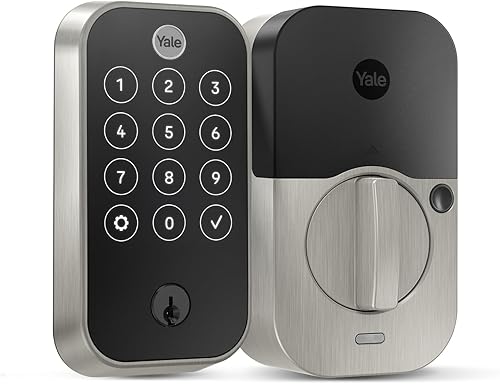
- Fingerprint scanner
- Bluetooth touchscreen keypad
- Passcode open
- Auto Open
- DoorSense
- 4 AA batteries
A strong choice for an entry door when fingerprint access is the main reason to upgrade. It also supports passcodes, a physical key, app control and optional remote access through a compatible Yale Wi-Fi module.
Pros
- Fingerprint entry
- Multiple access methods
- Bluetooth control
- DoorSense and battery indicator
- Auto Open
Cons
- No Wi-Fi included
- Compatibility needs checking outside the U.S. or Canada
- Remote access requires an optional module
The lock includes 4 AA batteries, DoorSense, a key, mounting hardware and the Yale Assure Lock 2 Touch deadbolt. It is designed for an entry door or front door, so measure your existing door setup and confirm the deadbolt preparation before installation.
Best for fingerprint entry
Fingerprint access is the main reason to choose this model. Yale says the scanner offers 99% accuracy and recognition in less than 0.5 seconds, but those are manufacturer claims rather than a guarantee for every finger, door or installation.
A fingerprint can be convenient when your hands are full or you don't want to remember a code. You should still set up another access method because biometric readers can be affected by how a finger is placed and by normal household conditions.
What access methods does the lock support?
The Yale Assure Lock 2 Touch supports fingerprint touch, passcodes, Bluetooth app control and a physical key. That mix gives you a backup when one method is inconvenient.
The touchscreen keypad is useful for people who don't want to enroll a fingerprint. A unique passcode can also suit a dogwalker, house sitter or repair worker, especially when you want to manage access through the Yale Access App.
The Yale Access App also supports virtual keys and an Activity Feed. Those tools can help you share access and review activity, but they don't remove the need to set clear access rules for the people who use your door.
The lock supports Android and iOS controllers and lists Apple HomeKit among its controller types. Bluetooth is the listed connectivity protocol, so keep your phone close enough for the local connection when using app features.
For broader door planning, start with this door deadbolt guide before replacing an existing lock. It covers the surrounding reinforcement and door hardware decisions that a smart deadbolt cannot solve by itself.
Does the Yale Assure Lock 2 Touch include Wi-Fi?
The Yale Assure Lock 2 Touch does not include Wi-Fi in this configuration. It uses Bluetooth out of the box, while remote access depends on adding a compatible Yale Wi-Fi module.
That distinction matters if you want to lock or open the door while away from home, check access remotely or connect the lock to a broader smart-home setup. Bluetooth control is local, so it should not be treated as the same feature as remote access.
The correct accessory depends on the specific Assure Lock 2 model and configuration. Check which Wi-Fi module fits the Yale Assure Lock 2 before ordering an add-on.
If you are still comparing Yale models, the Yale Assure lock reviews page can help you separate fingerprint models, keypad models and versions that are designed for different smart-home needs.
How does fingerprint entry compare with passcodes?
Fingerprint entry is best for regular residents who want quick personal access. Passcodes are more flexible for guests because you can share a code without registering another person's finger.
A fingerprint is not something you can hand to a visitor, and it may be less convenient for a household member who prefers a code. Passcodes also give you a simple backup when a finger does not register as expected.
Use different access methods for different people. Residents may prefer fingerprints, while recurring visitors can use a code or virtual key through the Yale Access App.
The keypad's matte design is intended to resist fingerprint marks, according to Yale's product description. That feature may help reduce obvious touch patterns, but it does not replace good code habits or regular cleaning.
Never post an active entry code where it can be seen from outside. Remove temporary access when it is no longer needed, and review the Activity Feed when you want to check who has used the lock.
What do Auto Unlock and DoorSense do?
Auto Open is designed to open the door as you approach, while DoorSense helps the lock understand the door's position. Together, they address two common daily tasks: getting inside without touching the lock and checking whether the door is properly closed.
Auto Open is most useful when you regularly arrive with groceries, bags or children. It also depends on the phone and app setup working as intended, so keep a passcode or physical key available.
DoorSense can add confidence that the door is closed before you leave. It cannot correct a door that is misaligned, warped or difficult to latch, so installation and door adjustment still matter.
The lock also includes Auto-Lock and a battery indicator. Choose a delay that fits your routine, then make sure the door closes fully before relying on automatic locking.
What should you check before installing it?
Check the door thickness, deadbolt preparation, latch alignment and available clearance before buying. The lock measures 0.88 x 2.5 x 4.88 inches, but those item dimensions do not replace a complete door-fit check.
Look at the inside and outside of the door. Confirm that the touchscreen, thumb turn and surrounding trim will not hit a storm door, wall, handle or narrow frame.
A deadbolt should move smoothly before the smart lock is attached. If you must push or pull the door to turn the existing deadbolt, correct that alignment first so the motor is not working against unnecessary resistance.
The included mounting hardware and deadbolt are intended to support installation, but follow Yale's instructions for your exact door. Do not assume every existing deadbolt hole has the right depth or spacing.
If you are replacing another connected lock, the Schlage Encode lock cylinder replacement guide may help you understand the difference between lock components and a complete deadbolt change.
How does it fit into a larger smart-home setup?
The Yale Assure Lock 2 Touch is most useful in a smart-home setup when you decide whether local Bluetooth access is enough. Add remote access only if you need to manage the lock while away from home.
Apple HomeKit is listed among the supported controller types, while Android and iOS are listed as supported platforms. Check your preferred system and the current Yale setup instructions before assuming every smart-home feature works in every arrangement.
If your main goal is a Yale lock that works with remote control, compare the best Yale smart door locks before choosing an accessory. The best model for you may depend on whether you value fingerprint entry, remote access, keypad control or a simpler setup.
For homes using another smart-home service, compatibility should be checked separately. A lock that works with one controller does not automatically work with every hub or app.
The same caution applies to myQ. If that platform is part of your home, review which smart door locks work with myQ before assuming the Yale lock can join your existing routine.
Could it work on a sliding door?
The Yale Assure Lock 2 Touch is described for an entry door or front door, not as a sliding-door lock. Its recommended uses are limited to those hinged entry points.
A sliding door normally needs hardware designed around its track, frame and latch position. The Yale deadbolt is built to fit a standard deadbolt preparation and to turn with a motor and thumb turn.
That difference matters in daily use. A patio slider closes by moving sideways into its frame, while a hinged door swings on hinges and locks with a bolt that extends into the frame.
Trying to force a deadbolt onto a sliding door can leave the lock poorly seated and hard to operate. It can also interfere with the track or the way the panels meet.
Clearance is another issue to check. A touchscreen keypad and fingerprint scanner need room on the outside face of the door, and a sliding panel often has a narrower stile and meeting rail.
Inside clearance matters too. The thumb turn and battery cover need space that does not clash with a handle, lock rail or the sliding panel when it opens.
If you are securing a patio slider, start with advice on a sliding door lock with chain and compare the security trade-offs of the frame and opening style. That approach works with how the door actually moves.
You can also review replacement sliding door lock handles if the problem is a worn handle or latch rather than a need for a biometric deadbolt. A handle swap may solve a sticking latch without changing the lock type.
For a sliding door, look for hardware made for sliders and check the stile width, latch height and track clearance before you buy. Those measurements decide fit more than the finish or the brand.
How should you manage batteries and access?
The Yale Assure Lock 2 Touch uses 4 AA batteries, and it includes a battery indicator. Set a reminder to check the battery status rather than waiting until the lock stops responding.
Keep the physical key in a secure place that is accessible during a low-battery situation. Don't leave it hidden in an obvious location near the door, and don't rely on a single phone or fingerprint method.
Create access for the people who need it, then remove old virtual keys and passcodes. A smaller access list is easier to review and reduces the chance that former guests retain entry permission.
Clean the touchscreen and fingerprint area according to Yale's care guidance. Avoid products or tools that could damage the screen, sensor or finish.
Yale Assure Lock 2 Touch review: final decision
The Yale Assure Lock 2 Touch is the better choice when fingerprint entry is your priority and Bluetooth access is enough for daily use. Its keypad, physical key, virtual keys, DoorSense and Auto Open give you several ways to handle normal entry.
Choose it with the optional Wi-Fi module if you need remote access. Choose a different Yale model if you do not want to manage fingerprint access or add an accessory for connected features.
Before ordering, confirm that you are in the U.S. or Canada, measure the door, check the deadbolt alignment and decide which household members need fingerprints, passcodes or virtual keys. That checklist matters more than choosing the lock by finish alone.
Frequently asked questions
Is the Yale Assure Lock 2 Touch worth it?
The Yale Assure Lock 2 Touch is a good fit if you want fingerprint entry, passcodes and Bluetooth app control in one entry-door lock. It makes less sense if you need remote access immediately, because this model has no Wi-Fi included and requires a compatible optional module for that function.
Does the Yale Assure Lock 2 Touch have Wi-Fi?
The Yale Assure Lock 2 Touch does not include Wi-Fi. It uses Bluetooth and supports app control, while remote access depends on adding a compatible Yale Wi-Fi module.
Check the exact module for this lock before ordering because Yale Assure versions do not all use the same accessory.
Can you open the Yale Assure Lock 2 Touch with a fingerprint?
Yes, the Yale Assure Lock 2 Touch includes a fingerprint scanner for biometric entry. It also supports passcode entry, a physical key and app-based access.
Fingerprint access is useful for residents who want to avoid carrying keys, but you should keep another approved access method available.
Does the Yale Assure Lock 2 Touch work outside the U.S. or Canada?
This Yale Assure Lock 2 Touch model is stated not to work outside the U.S. or Canada. Confirm your location and door requirements before buying, and check the installation instructions for the correct door preparation and fit.