9 Best Fingerprint Locks for Front Doors (November 2026)
The best fingerprint locks for front doors include the Sifely Fingerprint Smart Door Lock with Handle for flexible family access, the Yamiry Smart Door Handle Lock with Keypad for rental access codes, and the Wyze Auto-Lock Bolt v2 for built-in Wi-Fi.
On this page (6 sections)
- The best fingerprint locks for front doors by use
- What should you check before installing a front door fingerprint lock?
- Is built-in Wi-Fi worth it on a fingerprint door lock?
- Fingerprint lock versus keypad or key access
- How to care for a front door fingerprint lock
- Final verdict on the best fingerprint lock for front door use
The best fingerprint lock for front door use is the Sifely Fingerprint Smart Door Lock with Handle for homes that want fingerprint, keypad, app, fob and key entry.
That mix helps because one person may prefer a quick touch while another prefers a code they know. Choose Philips for built-in Wi-Fi, Wyze for remote control with no separate gateway, or Veise KS02A for simple local family access.
A front door sees more variety than most doors at home. Children may forget a key, a guest may need a temporary code, and a service worker may arrive while you are away.
A fingerprint lock should make those moments simpler without making entry harder for anyone. Fingerprints are fast for daily use, while a keypad, app, fob, mechanical key or emergency power option helps when a scan is inconvenient.
Some fingers are dry, wet, worn or hard to read in cold weather. A code gives that person a calm alternative instead of repeated attempts at the reader.
An app can help you check status, manage a user or let someone in from elsewhere. A fob or key can suit a child, an older family member or a guest who does not want to use an app.
Think about who uses the door most before you decide which methods matter most. A busy family may value speed first, while a rental host may value temporary codes and access records first.
Check the handle format as well, because a handle set changes more of the entry than a deadbolt alone. Keep your current handle with a deadbolt format, or choose a full set if the handle is worn or does not match.
Measure the door and confirm the bore before you order, since small differences can affect fit. Also consider weather exposure, because a front door faces rain, sun and temperature changes.
Keep the physical key or emergency power option in mind as part of the plan. If you are still deciding, start with this guide to door deadbolt choices.
For a broader biometric comparison, see our best biometric fingerprint door lock guide.
Our picks at a glance
-
1
 Best for flexible family access
Sifely Fingerprint Smart Door Lock with Handle
9.7/10 our score
See it on Amazon -
2
 Best for rental access codes
Yamiry Smart Door Handle Lock with Keypad
9.7/10 our score
See it on Amazon -
3

- 4
 Check it
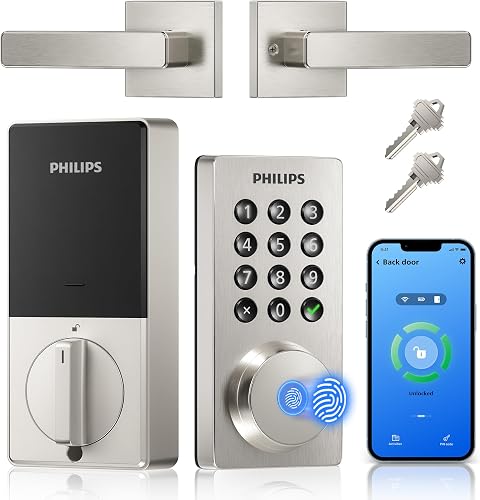
Philips WiFi Keypad Door Lock with Handle
Best for direct Wi-Fi handle upgrades - 5
 Best for eufy householdsCheck it
- 6
 Check it
Veise KS02A Fingerprint Door Lock
Best for local family entry - 7
 Check it
DESLOC B200 Fingerprint Smart Lock
Best for a complete handle set - 8
 Check it
Veise VE017 Fingerprint Smart Door Lock
Best for detailed user management - 9
 Check it
DESLOC B200 Smart Front Door Lock Handle
Best for a handle-focused replacement
The best fingerprint locks for front doors by use
The best fingerprint lock for front door use depends on how you enter, who needs access and whether you need remote control. The products below are ordered by score, with the highest-scoring options first.
Our score weighs specs, features and buyer feedback against what you are shopping for. We compared entry methods, handle format, app and Wi-Fi needs, battery details, weather resistance and installation information.
| Product | Best for | Entry methods | Size | Material | Our score |
|---|---|---|---|---|---|
| Sifely Fingerprint Smart Door Lock with Handle | flexible family access | Fingerprint, keypad, app, fob and key | 7 x 3 x 1.12 in | Zinc | 9.7 |
| Yamiry Smart Door Handle Lock with Keypad | rental access codes | Fingerprint, app, passcode, fob, key and voice | 5.5 x 2.95 x 0.79 in | Stainless steel and zinc | 9.7 |
| Wyze Auto-Lock Bolt v2 | built-in Wi-Fi | Fingerprint, app, keypad and key | 7.09 x 2.93 x 1.41 in | Aluminum and glass | 9.5 |
| Philips WiFi Keypad Door Lock with Handle | direct Wi-Fi handle upgrades | Fingerprint, app, voice and keypad | Aluminum | 9.4 | |
| eufy Security Smart Lock C220 | eufy households | Fingerprint, app, keypad, key, Apple Watch and voice | Aluminum | 9.3 | |
| Veise KS02A Fingerprint Door Lock | local family entry | Fingerprint, password and mechanical key | Aluminum, metal and zinc | 9.1 | |
| DESLOC B200 Fingerprint Smart Lock | a complete handle set | Fingerprint, PIN, app, eKey, fob and key | Aluminum | 8.9 | |
| Veise VE017 Fingerprint Smart Door Lock | detailed user management | Fingerprint, app, code, fob, card and key | Aluminum, metal and zinc | 8.8 | |
| DESLOC B200 Smart Front Door Lock Handle | a handle-focused replacement | Fingerprint and app control | Metal | 8.6 |
Sifely Fingerprint Smart Door Lock with Handle: Best for flexible family access
Sifely is the strongest all-around choice when one household needs several access methods. It supports fingerprint, keypad, app, fob and key entry, so children, older family members and guests can use the method that suits them.
The handle is reversible for left and right doors, and the lock is designed for most standard doors without extra drilling. Its listed dimensions are 7 x 3 x 1.12 in, with a zinc body and satin nickel finish.
The Sifely app manages users and access records. The optional Sifely WiFi Gateway adds remote access, Alexa and Google Assistant compatibility.
Without that gateway, the lock still provides Bluetooth app control.
Sifely also lists IP65 weather resistance and operation from 14 F to 158 F. The lock uses 4 AA batteries, which are not included, and it has a power-bank method for emergency power.
Choose Sifely when flexible entry matters more than keeping the setup minimal. It is also a good match for rental access because the app can create guest codes and manage access records.
Sifely Fingerprint Smart Door Lock with Handle: Best for flexible family access
- Fingerprint, keypad, app, fob and key entry
- Optional Sifely WiFi Gateway
- Reversible handle
- IP65 weather resistance
Sifely combines a handle, fingerprint reader, keypad, app, fob and key access. The optional WiFi Gateway adds remote access and Alexa or Google compatibility.
Pros
- Many entry choices
- Reversible handle
- IP65 weather resistance
Cons
- WiFi Gateway is optional
- 4 AA batteries are not included
Yamiry Smart Door Handle Lock with Keypad: Best for rental access codes
Yamiry gives you fingerprint, Bluetooth app, passcode, fob, mechanical key and voice access. That range fits a front door shared by family members, cleaners, guests or short-term renters.
Its app can create permanent or temporary access, including one-time passcodes for visitors. Remote control and Alexa voice opening require the separately sold WiFi gateway.
The reversible handle is designed for left or right doors and fits most standard American wooden front doors. Installation uses a screwdriver and does not require additional drilling according to the product information.
The lock measures 5.5 x 2.95 x 0.79 in and uses stainless steel and zinc. Its illuminated keypad helps with nighttime code entry, while the weather-resistant design suits exterior use.
Yamiry is a practical pick when the front door needs a handle replacement and several people need different access methods. Check your door and existing hardware before ordering.
Yamiry Smart Door Handle Lock with Keypad: Best for rental access codes
- Fingerprint, app, passcode, fob, key and voice entry
- Remote one-time passcodes with gateway
- Reversible handle
- Fits most standard American wooden front doors
Yamiry fits readers who manage family, guest or rental access through several entry methods. Its handle replaces an existing handle, knob or deadbolt with a screwdriver.
Pros
- Six entry methods
- Remote code management with gateway
- Reversible handle
Cons
- WiFi gateway is separately sold
- Fit still needs a door check
Wyze Auto-Lock Bolt v2: Best for built-in Wi-Fi
Wyze Auto-Lock Bolt v2 is the best fit when you want built-in Wi-Fi and remote lock management without adding a separate gateway. It supports fingerprint, app, keypad and physical key entry.
The fingerprint scanner is described as opening in 0.5 seconds, and the AI scanner learns from use. Wyze also lists up to 8 months of battery use, with 8 AA batteries included in the box.
A USB-C port provides emergency power if the batteries run out. The lock includes auto-lock, anti-peep keypad protection, IP53 weather resistance and BHMA2 durability.
The aluminum and glass lock measures 7.09 x 2.93 x 1.41 in. It is a deadbolt format, so compare it with your current door hardware before choosing it over a handle-set model.
For another touchscreen deadbolt, read the Yale Assure Lock 2 Touch review.
Wyze makes the most sense for a home already using Wyze devices. When paired with a Wyze Video Doorbell, the lock can be controlled from the live feed.
Wyze Auto-Lock Bolt v2: Best for built-in Wi-Fi
- Fingerprint, app, code and physical key entry
- Built-in Wi-Fi
- Up to 8 months of battery use
- IP53 and BHMA2
Wyze is a strong fit when remote control matters without adding a separate gateway. Its tempered-glass scanner, USB-C emergency power and included 8 AA batteries address daily access and battery backup.
Pros
- Built-in Wi-Fi
- 8 AA batteries included
- USB-C emergency power
Cons
- Uses a deadbolt format
- IP53 is below the highest weather rating here
Philips WiFi Keypad Door Lock with Handle: Best for direct Wi-Fi handle upgrades
Philips combines a fingerprint reader, keypad, app control, voice control and a matching handle set. For another Wi-Fi deadbolt, see the Schlage Encode review.
Its built-in 2.4GHz Wi-Fi connects directly to your network, so no bridge is needed.
The Philips Home Access app can manage fingerprints and codes, show lock status and monitor access history. It supports permanent, one-time, periodic and recurring PIN codes for family, guests or service workers.
Auto-lock can be set from 0 to 180 seconds. The product fits doors from 1-3/8 to 1-3/4 in thick, so measure the door before choosing it.
The aluminum lock includes 2 levers, a latch assembly, mounting hardware and a user manual. It uses 8 AA alkaline batteries, which are not included, and includes 2 mechanical keys for manual entry.
Choose Philips when you want a complete handle upgrade with remote access built into the lock. For a camera-equipped alternative, compare it with our best fingerprint door lock with camera guide.
Philips WiFi Keypad Door Lock with Handle: Best for direct Wi-Fi handle upgrades
- Built-in 2.4GHz Wi-Fi
- Fingerprint, app, voice and keypad entry
- 0 to 180 second auto-lock
- Handle set included
Philips pairs a handle set with direct 2.4GHz Wi-Fi, so remote app control does not need a bridge. It also supports permanent, one-time, periodic and recurring PIN codes.
Pros
- No bridge needed
- Handle set included
- Adjustable auto-lock
Cons
- 8 AA batteries are not included
- Door thickness must be checked
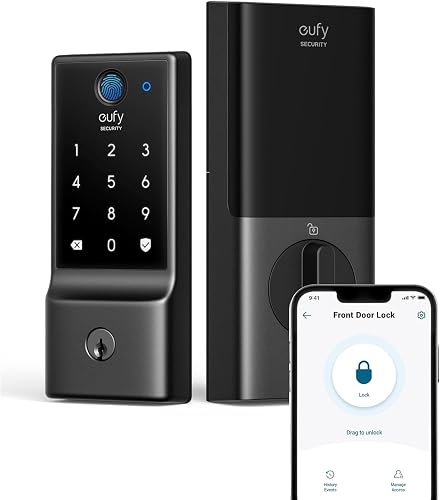
eufy Security Smart Lock C220: Best for eufy households
eufy C220 suits homes that already use eufy security devices. It supports fingerprint, app, keypad, physical key, Apple Watch and voice entry, with built-in Wi-Fi and no bridge required.
The lock can store up to 50 fingerprints and 100 passcodes. eufy also lists self-learning fingerprint recognition, real-time notifications, auto-lock and unusual-attempt alarms.
Eight AA batteries are included, with about 8 months of battery use. The lock has an aluminum body, IP53 water resistance and BHMA Grade 3 certification.
C220 fits most standard deadbolts and bores under 54 mm when the spacer is removed. It does not include a handle set, so it works best when your current handle remains in place.
Choose eufy when app control and connection to a eufy doorbell matter. Note that the lock cannot be rekeyed, which may affect how you plan your physical key setup.
eufy Security Smart Lock C220: Best for eufy households
- Six entry methods
- Built-in Wi-Fi
- Up to 8 months with 8 AA batteries
- BHMA Grade 3 and IP53
eufy C220 fits homes already using eufy devices, especially a eufy doorbell. It stores up to 50 fingerprints and 100 passcodes, with built-in Wi-Fi and no bridge required.
Pros
- Large fingerprint and code capacity
- Built-in Wi-Fi
- 8 AA batteries included
Cons
- Does not include a handle set
- Cannot be rekeyed
Veise KS02A Fingerprint Door Lock: Best for local family entry
Veise KS02A is a straightforward fingerprint and keypad deadbolt for households that do not need app or Wi-Fi control. It stores up to 20 fingerprints and 20 user passwords, plus one-time codes for temporary visitors.
The lock supports anti-peeping passwords, silent mode, vacation mode and auto-lock from 10 to 99 seconds. A mechanical key remains available as a backup.
Its aluminum, metal and zinc body fits doors from 1-3/8 to 2 in thick with a compatible 2-1/8 in lock hole. The lock is IP54 weather resistant and carries ANSI Grade 3 and BHMA certification.
Veise says the lock can run for up to 365 days with 4 AA alkaline batteries, which are not included. A red indicator warns when battery power is low.
KS02A does not include a handle. Choose it when your current handle is suitable and you want local fingerprint and code access without adding app management.
Veise KS02A Fingerprint Door Lock: Best for local family entry
- Up to 20 fingerprints and 20 user passwords
- 10 to 99 second auto-lock
- IP54 weather resistance
- ANSI Grade 3 and BHMA certified
KS02A suits families that want fingerprint and keypad access without app-based controls. One-time codes, anti-peeping codes, silent mode and vacation mode add useful control at the door.
Pros
- 20 fingerprints and 20 user codes
- Wide door-thickness range
- Up to 365 days with 4 AA batteries
Cons
- Does not include a handle
- Batteries are not included
DESLOC B200 Fingerprint Smart Lock with 2 Lever Handles Set: Best for a complete handle set
DESLOC B200 includes a deadbolt and 2 lever handles, making it a useful choice for a front-door replacement that needs matching hardware. It supports fingerprint, PIN, app, eKey, fob and physical key entry.
The Bluetooth connection works with the TTLock app within about 2 meters. Remote control requires the separately sold G2 Gateway, and voice control through Alexa or Google also requires that connection.
The lock uses 4 AA batteries, which are not included, and provides about 12 months of battery use. A low-battery indicator and USB Type-C emergency power port help with battery planning.
DESLOC lists IP54 water resistance, auto-lock, privacy mode and anti-peeping code protection. The aluminum lock is intended for residential main entry doors.
Choose this model when the included handle set matters more than built-in Wi-Fi. It is a different fit from the handle-only B200 variant below, so compare what each box includes.
DESLOC B200 Fingerprint Smart Lock: Best for a complete handle set
- Fingerprint, PIN, app, eKey, fob and key entry
- Two lever handles included
- About 12 months with 4 AA batteries
- USB-C emergency power
DESLOC B200 includes a deadbolt and 2 lever handles, making it useful for a front-door replacement where a matching handle set matters. Remote control requires the separately sold G2 Gateway.
Pros
- Handle set included
- About 12 months of battery use
- USB-C emergency power
Cons
- Remote control needs a gateway
- 4 AA batteries are not included
Veise VE017 Fingerprint Smart Door Lock: Best for detailed user management
Veise VE017 is aimed at homes, rentals and other properties where access permissions change often. The KK Home app can add, rename, pause and delete users, while activity logs show access events.
It supports fingerprint, app, authorized access, fob card, code, code sharing and mechanical key entry. One-time, duration, permanent and recurring codes cover different visitor needs.
The lock stores access data on the device with AES128 encryption according to the product information. It also includes away mode, silent mode, anti-peeping code protection and active intrusion alerts.
VE017 fits doors from 1-3/8 to 2 in thick, with compatible lock holes of 1-1/2 or 2-1/8 in. It is made from aluminum, metal and zinc, with IP55 weather resistance.
Remote lock and open require the Veise G1 Gateway. The lock does not include a handle, so confirm that your existing handle and door layout work with a deadbolt-only replacement.
Veise VE017 Fingerprint Smart Door Lock: Best for detailed user management
- Fingerprint, app, code, fob, card and key entry
- KK Home app user management
- 0 to 180 second auto-lock
- IP55 weather resistance
VE017 is aimed at homes or properties where access permissions change often. The KK Home app supports adding, pausing and deleting users, while remote control needs the Veise G1 Gateway.
Pros
- Detailed access management
- IP55 weather resistance
- USB-C emergency port
Cons
- Does not include a handle
- Gateway is required for remote access
DESLOC B200 Smart Front Door Lock Handle Set: Best for a handle-focused replacement
This DESLOC B200 variant is for buyers who want fingerprint and app control in a front-door handle format. It uses Bluetooth with the TTLock app, while remote control requires the separately sold G2 Gateway.
The product information lists about 12 months of use with 4 AA batteries, which are not included. It also lists a low-battery indicator, USB Type-C emergency power, auto-lock and anti-peeping user-code protection.
The body uses metal and has a black powder-coated finish. The included-components field lists a deadbolt, so confirm the handle hardware you need before ordering.
Choose this model when the handle format and DESLOC app system are the priority. If you want a model with physical keys and a clearer included handle set, the other DESLOC B200 option is a better match.
DESLOC B200 Smart Front Door Lock Handle: Best for a handle-focused replacement
- Fingerprint and app control
- TTLock Bluetooth control
- About 12 months with 4 AA batteries
- Handle-set format
This DESLOC B200 variant suits a front door where the handle format is the main priority. It uses TTLock app control nearby and needs the separately sold G2 Gateway for remote control.
Pros
- Handle-focused design
- About 12 months of battery use
- Fingerprint and app access
Cons
- Only a deadbolt is listed as included
- Remote control needs a gateway
What should you check before installing a front door fingerprint lock?
Check the door thickness, bore size, lock format and included hardware before choosing a fingerprint front door lock. A deadbolt-only model may fit an existing handle, while a handle-set model replaces more of the entry hardware.
Measure the door thickness and compare it with the product range. Philips fits 1-3/8 to 1-3/4 in doors, while Veise KS02A and VE017 fit 1-3/8 to 2 in doors.
Next, check whether the product includes a handle. Sifely, Yamiry, Philips and the DESLOC B200 with 2 lever handles include handle hardware or a handle format.
Veise KS02A, Veise VE017 and eufy C220 are better treated as deadbolt-focused choices.
Installation details also matter. Many of these products describe screwdriver installation without extra drilling, but that does not remove the need to check alignment, bore size, door thickness and latch position.
For a deadbolt-only setup, our best fingerprint deadbolt door lock guide can help narrow the format. If your door is sliding glass rather than hinged, use a security bar for sliding glass doors instead.
Is built-in Wi-Fi worth it on a fingerprint door lock?
Built-in Wi-Fi is worth choosing when you need remote access, app status checks or voice control away from home. It matters less when fingerprint, keypad and physical key access cover your normal routine.
Daily entry at the door does not need a network connection in most cases. Your phone can reach the lock by Bluetooth nearby, and your finger or code can work without any app.
Wi-Fi becomes useful when the door must be managed from a distance. That may mean letting in a guest, checking whether the door locked, or reviewing who entered while you were out.
It can also support voice control through a smart speaker for hands-full moments. Wyze, Philips and eufy C220 include built-in Wi-Fi.
That removes one separate device from the setup and can make remote control simpler to arrange. Sifely, Yamiry, DESLOC B200 and Veise VE017 use an optional gateway for remote access or voice features.
A gateway can still be a good fit, but count it as part of the system from the start. You will need a place for it, power for it and time to connect it during setup.
It may fit best when you already use the same brand for other devices at home. Bluetooth-only control can be enough if you manage users near the door.
Creating a code or adding a fingerprint at the lock also works without remote access for many households. The trade-off is that you cannot check or change access from away from home without the added connection.
That matters more for a rental, a second home or a busy household with regular visitors. It matters less for a single family who mostly come and go together.
Watch the 2.4GHz detail on models that connect directly to home Wi-Fi, and place the lock within a reliable signal range. A weak signal can make remote checks slow even when the lock works well at the door.
Remote access should not replace a backup entry plan. Keep the physical key, emergency power port or another supported method available, and check batteries before a low-power warning.
A remote lock is only helpful when people who need entry still have a reliable way in.
Fingerprint lock versus keypad or key access
Fingerprint access is fastest for many daily entries, but keypad and key access are important backups. A fingerprint may not be convenient for every family member, visitor or temporary guest.
Keypad access is useful for children, service workers and renters because you can share a code instead of handing over a key. Anti-peeping features help hide the real code when someone is nearby.
Mechanical keys remain useful during battery problems or app issues. Philips includes 2 mechanical keys, while several other models in this group also include physical keys.
Check the exact model before assuming a key is included.
If you prefer a key backup above all else, compare these models with our guide to the best fingerprint door lock with key.
How to care for a front door fingerprint lock
Keep the fingerprint reader and keypad clean and dry, and follow the installation instructions for alignment. A latch that rubs against the strike plate can make any electronic lock harder to operate.
Wipe the reader with a soft dry cloth and check that the keypad responds clearly. Avoid harsh cleaners or soaking the lock, since moisture and residue can affect sensors and touch surfaces over time.
Check alignment whenever the door feels harder to close or the deadbolt sounds strained. Seasonal movement can change how a door sits in the frame, even when the lock was fitted well at first.
Small adjustments to the strike plate or latch area can restore smooth movement without replacing hardware. Test the lock from both sides after any change, and use each entry method you plan to rely on.
Keep the door fully closed before you test auto lock, so the bolt can engage properly each time. Replace batteries when the lock gives a low-power warning.
Models with emergency power ports provide another option, but port types differ, including USB-C on Wyze and DESLOC models. Use the correct battery type for your model and replace the set as directed rather than mixing old and new cells.
Note the date when you change batteries, since that makes the next check easier to plan. Keep a spare set in a cool dry place so a warning does not turn into an urgent problem.
Review stored fingerprints and codes from time to time. Delete access for former guests, service workers or tenants, and use one-time or recurring codes when a permanent code is unnecessary.
That habit matters especially for rentals and homes where cleaners, sitters or contractors come and go. Check app records where available, and remove names you no longer recognise.
Weather ratings differ across this group. Sifely lists IP65, Veise VE017 lists IP55, Veise KS02A and DESLOC B200 list IP54, and Wyze and eufy C220 list IP53.
Treat those ratings as a guide to exposure, not as a promise that no care is needed. Rinse away grit after storms, dry the lock after heavy rain and keep the strike area free of debris.
Inspect the finish each season, and tighten loose screws only as the instructions allow. Good care keeps the reader accurate, the bolt smooth and backup methods ready when you need them.
Final verdict on the best fingerprint lock for front door use
The Sifely Fingerprint Smart Door Lock with Handle is the best fingerprint lock for front door use when you want the widest mix of fingerprint, keypad, app, fob and key entry.
That range gives each user a method that fits their comfort and routine. Choose Yamiry for rental-style code management, Wyze for built-in Wi-Fi, Philips for a direct Wi-Fi handle upgrade, and Veise KS02A for local family access.
Yamiry suits a door shared by family, guests or short-term renters who need different access types. Wyze suits a household that wants remote control without adding a separate gateway.
Philips suits a buyer replacing the handle and lock together while keeping control in one app. Veise KS02A suits a family that wants fingerprint and code entry at the door without app based management.
DESLOC B200 suits a front door where a matching lever handle set is part of the upgrade. Veise VE017 suits a property where permissions change often and detailed records matter.
eufy C220 suits a home already using eufy devices, especially when a eufy doorbell is part of the entry. Those fits are practical trade-offs rather than better or worse choices in every home.
Choose a handle-set model when replacing the full entry hardware. A handle set can give a cleaner match between lock, lever and door finish.
It also suits a door where the old handle is worn, stiff or hard for family members to use. Choose a deadbolt-only model when your current handle works and you want a simpler hardware change.
Before you choose, measure door thickness and check bore size, latch position and included hardware. Confirm whether batteries, keys, fobs and a gateway are included or need to be bought separately.
Also plan for battery changes and for a backup key or emergency power method. A lock that fits your door, your users and your control needs will serve you better than one chosen for features alone.
Use the shortlist above to match format and entry methods to your household, then care for the reader, codes and batteries over time.
Our top 3 picks at a glance
-
1
Best for flexible family access
Sifely Fingerprint Smart Door Lock with Handle
9.7/10 our score
See it on Amazon -
2
Best for rental access codes
Yamiry Smart Door Handle Lock with Keypad
9.7/10 our score
See it on Amazon -
3
Frequently asked questions
What is the best fingerprint lock for front door use?
The Sifely Fingerprint Smart Door Lock with Handle is the best fingerprint lock for front door use in this group because it combines fingerprint, keypad, app, fob and key entry. Its reversible handle, optional gateway and IP65 weather resistance suit many family and rental setups.
Are fingerprint door locks secure for exterior doors?
Fingerprint door locks can be suitable for exterior doors when the model's weather rating, door fit and backup access match your entry. This group includes ratings such as IP53, IP54, IP55 and IP65.
Keep a key or emergency power method available.
Do fingerprint front door locks need Wi-Fi?
No. Fingerprint front door locks can work with fingerprint, keypad, fob or key entry without Wi-Fi.
Wi-Fi matters when you want remote access, activity records or voice control.
Some models have built-in Wi-Fi, while others require a separate gateway.
Should I choose a fingerprint lock with a handle?
Choose a fingerprint lock with a handle when you are replacing the full entry set or want the handle and lock to match. A deadbolt-only model may fit a current handle more easily, but you must confirm the existing door hardware and bore dimensions.
How do I choose between fingerprint and keypad access?
Choose fingerprint access for quick entry without remembering a code. Choose keypad access when family members have unclear fingerprints, when you need temporary codes, or when you want a backup method that does not depend on a finger scan.