How to Replace a SentrySafe Battery Holder
To replace a SentrySafe battery holder, match the holder and connector to your safe’s model, then follow that model’s instructions. Don’t force a plug or substitute a holder that only looks similar.
On this page (7 sections)
- How to Replace a SentrySafe Battery Holder
- How do you identify the right SentrySafe battery holder?
- How do you replace a SentrySafe battery holder?
- What if the new holder doesn’t restore keypad power?
- Can you open a SentrySafe while waiting for a holder?
- When should you contact SentrySafe support?
- How do you choose the next step for a SentrySafe battery holder?
How to Replace a SentrySafe Battery Holder
To replace a SentrySafe battery holder, identify your exact safe model and match the holder and connector before installing it. Follow the model’s manual, and don’t force a plug, pry out a stuck holder, or guess at wiring.
A holder that looks close may still have a different connector or fit. If you can’t confirm the match, pause and ask SentrySafe support about your model.
How do you identify the right SentrySafe battery holder?
Find the safe’s model number before shopping for a replacement holder. Check the owner’s manual or the model label on the safe, then use that information to confirm the correct part with SentrySafe or an authorized parts source.
Compare the holder’s shape, battery arrangement, and connector with the original. A similar color or size alone doesn’t establish compatibility.
If the original holder is missing, don’t guess from a photo of another safe. Share the model number with SentrySafe support and ask which holder is compatible.
How do you replace a SentrySafe battery holder?
Use the instructions for your exact model, and stop if any part doesn’t fit easily. Safe designs vary, so a procedure for one SentrySafe may not apply to another.
- Confirm the model number and find its manual.
- Follow the manual’s steps for reaching the battery compartment.
- Remove batteries only as directed, and note their orientation.
- Release the old holder as instructed, without pulling its wires.
- Connect the replacement only if the plug matches and seats without force.
- Install the batteries in the indicated direction and test the keypad as the manual describes.
Don’t cut wires, bend contacts, or modify a connector to make it fit. If the holder is damaged or inaccessible, contact SentrySafe for model-specific instructions.
What should you check before buying a SentrySafe battery holder?
Confirm the model and connector before ordering. You can also compare your safe with best digital safes for home if you’re considering a replacement safe rather than a repair.
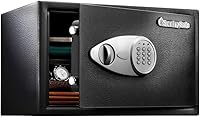
The SentrySafe Black Home Safe with Shelf has a digital keypad and two override keys. Its product information identifies model X125, which may help readers comparing options or confirming a safe model.
A new safe won’t provide the replacement holder for your existing unit. Keep the model number and current holder details handy when contacting support.
What if the new holder doesn’t restore keypad power?
Check the battery orientation and connector seating against the manual. If they appear correct and the keypad stays off, stop troubleshooting before bending contacts or trying another holder.
For battery replacement steps that don’t involve changing the holder, see how to change a safe battery. If the keypad still won’t respond, contact SentrySafe with the model number and a description of what you replaced.
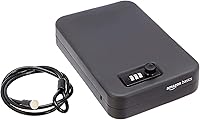
The Amazon Basics Steel Security Safe has a digital keypad and two emergency override keys. It’s a separate safe option for readers comparing keypad safes, but its batteries and holder aren’t a substitute for parts made to fit a SentrySafe model.
Can you open a SentrySafe while waiting for a holder?
Use only an entry method approved for your safe’s model. Some models have override keys, but don’t assume your safe includes one or try to force the door or keypad.
If the batteries are dead, how to open a safe with a dead battery explains what to check before you act. For model-specific steps, use the instructions for how to open a SentrySafe.
Avoid drilling, prying, or taking apart the keypad. Those actions can damage the safe and may make a repair harder.
The SentrySafe 1-Hour Fireproof Safe has a digital keypad and a secondary locking key. Consider it only as a separate safe choice; it doesn’t establish which holder fits your current unit.
For readers weighing fire protection, compare best SentrySafe fireproof safes and check each model’s instructions and features.
When should you contact SentrySafe support?
Contact SentrySafe if you can’t identify the holder, the connector won’t seat, or the keypad remains unresponsive. Provide the model number and describe the holder and the steps you’ve tried.
Don’t continue if wires look damaged, contacts are bent, or the holder won’t release as the manual describes. Model-specific guidance is safer than adapting instructions from a different safe.
How do you choose the next step for a SentrySafe battery holder?
If you have the model number and can confirm an exact match, follow that model’s manual to replace the holder. If compatibility or access is uncertain, ask SentrySafe before buying or installing a part.
If the safe still won’t power on, use the model’s approved entry instructions and contact support. Choose a separate safe only if you’re replacing the unit, not as a fix for a mismatched holder.
Frequently asked questions
Can I use any battery holder in a SentrySafe?
No. Match the replacement to your safe’s exact model and the holder’s connector, shape, and battery arrangement.
Similar-looking holders may not fit or connect correctly.
Check the model label and manual, and contact SentrySafe if you can’t confirm compatibility before ordering.
Should I remove the batteries before replacing a holder?
Follow the instructions for your safe’s model. If they direct you to remove the batteries, take them out before handling the holder, and avoid pulling on the wires or forcing the connector.
Stop if the holder is stuck, damaged, or difficult to reach.
What if my SentrySafe has no power after the holder is replaced?
Check that the batteries are installed in the correct direction and that the holder’s connector is fully seated as the manual shows. Don’t bend contacts or force a plug.
If the keypad still has no power, use the model’s support instructions or contact SentrySafe.
Can I open a SentrySafe with a dead battery?
It depends on the model. Some SentrySafe models include override keys, but you should confirm the instructions for your safe before trying an entry method.
See the guide to opening a safe with a dead battery, and contact SentrySafe if you don’t have the required key or instructions.