Can PoE Security Cameras Work with a DVR?
PoE security cameras usually work with an NVR, not a traditional analog DVR. A PoE camera sends digital video and power through Ethernet, while a DVR normally records analog video from coaxial cameras.
On this page (9 sections)
- Can a PoE security camera work with a DVR?
- What is the difference between a DVR and an NVR?
- Can you use a PoE switch with a DVR?
- Which PoE recorder setup suits a small camera system?
- Can a PoE camera system record without internet?
- What should you check before using a DVR with PoE cameras?
- Are PoE cameras better than analog cameras?
- Can you view PoE cameras on a monitor?
- What is the simplest choice for a PoE security camera DVR system?
PoE security cameras generally work with an NVR or a compatible network recorder, not a standard analog DVR. The key difference is the signal: PoE cameras send digital video over Ethernet, while traditional DVR systems usually receive analog video through coaxial cable.
A recorder can still be part of a PoE setup, but the recorder must accept network cameras. Before you connect anything, check the recorder's camera compatibility, available ports, and power method.
Can a PoE security camera work with a DVR?
A PoE security camera does not normally plug into a traditional DVR and work automatically. A DVR expects an analog camera signal, but a PoE camera produces an IP video stream and uses Ethernet for its network connection.
Some hybrid recorders accept analog and IP cameras. Even then, compatibility depends on the camera protocol, recorder software, resolution support, and network setup.
A PoE camera also needs power. That power may come from a PoE NVR, PoE switch, or PoE injector.
A regular DVR's coaxial inputs usually provide neither the right network connection nor PoE power.
If you're still comparing camera types, our guide to what is a PoE security camera explains how power and video travel through one Ethernet cable.
What is the difference between a DVR and an NVR?
A DVR records analog camera signals, while an NVR records digital video from network cameras. This makes an NVR the more natural recorder for PoE security cameras.
A typical DVR system uses coaxial cables from each camera to the recorder. The camera sends an analog signal, and the DVR processes and stores it.
An NVR works with IP cameras over a network. In a PoE system, one Ethernet cable can carry both power and video when the NVR has PoE ports or connects to a suitable PoE switch.
The cable type is only part of the decision. A network camera can still fail to connect if the recorder does not support its protocol or if the camera is restricted to a specific recorder family.
How does a PoE security camera DVR setup differ from an NVR setup?
A PoE security camera DVR setup needs a recorder that specifically supports IP inputs. You may connect the cameras through a PoE switch, assign them to the recorder, and confirm that the DVR can decode and store their video.
An NVR with built-in PoE ports is usually simpler for a new installation. Each camera can connect directly to a recorder port, reducing the number of separate power components.
This does not mean every NVR works with every PoE camera. Brand restrictions matter.
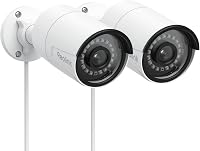
For example, the REOLINK PoE Security Camera RLC-510A supports Reolink PoE NVRs and does not support third-party NVRs or camera systems.
The RLC-510A uses Ethernet rather than Wi-Fi and supports 5MP video at 25 frames per second. It can save recordings to a supported 512GB microSD card, FTP server, NAS, or compatible Reolink PoE NVR.
The microSD card and recorder are not included.
Its person, vehicle, and animal detection can help reduce irrelevant alerts, with animal detection supported after the camera firmware is updated. The cameras also have aluminum enclosures, fixed focus, and up to 100 ft of infrared night vision.
Choose this pair when you want separate cameras and already have, or plan to choose, compatible Reolink recording equipment. Skip it if your existing recorder is a third-party DVR or if you need a wireless camera.
Can you use a PoE switch with a DVR?
You can use a PoE switch only when the recorder accepts network cameras. The switch can supply power and place the cameras on the local network, but it cannot convert a digital IP stream into the analog signal expected by a traditional DVR.
A PoE switch may be useful when the recorder has no built-in PoE ports. Connect the cameras to the switch, connect the switch to the recorder's network port, and then add the cameras through the recorder's setup menu if the devices are compatible.
A PoE injector can power one compatible camera, but it does not solve recorder compatibility. It only adds power to the Ethernet connection.
When planning the layout, keep each Ethernet run within the cable distance supported by the equipment. Use weather-appropriate installation methods for outdoor cameras, protect connectors from moisture, and keep the recorder in a dry, ventilated location.
Which PoE recorder setup suits a small camera system?
A small system usually benefits from a compatible PoE NVR with enough ports for the cameras you plan to install. Built-in PoE ports can simplify wiring because the recorder handles the network connection and camera power.
The REOLINK 8CH 5MP PoE Security Camera System includes 4 wired 5MP cameras, an 8-channel NVR, and a pre-installed 2TB HDD. Its cameras connect to the NVR through Ethernet, and the system is designed for 24/7 recording.
The system supports person, animal, and vehicle detection, plus infrared night vision up to 100 ft. Reolink says the cameras can keep recording locally even when internet access is unavailable, while remote playback through the free app needs network access.
This setup suits a new installation where you want the cameras and recorder selected as one system. It is less useful if you already own a traditional DVR and want to reuse its coaxial camera inputs.
Can a PoE camera system record without internet?
Yes, local recording can continue without internet when the cameras and recorder share a working local connection. Internet is mainly needed for remote access, app features, or alerts that depend on an outside connection.
The Hiseeu 4K PoE PTZ Security Camera System includes 6 5MP PTZ cameras, a 16-channel NVR, and a 3TB HDD. Its NVR has 8 built-in PoE ports and can expand to 16 channels with an additional PoE switch.
The cameras support 300-degree pan, 90-degree tilt, and automatic human tracking. The system also includes two-way audio and audio recording, while the NVR can support local TV monitor viewing without internet.
Remote access through the app or PC software needs a router connection to the internet.
Choose this system when camera movement, local storage, and future channel capacity matter. Its 6-camera design is more than most small installations need, so measure the areas you want to cover before choosing a multi-camera kit.
What should you check before using a DVR with PoE cameras?
Check four items before buying or connecting a recorder: camera type, network compatibility, power, and storage. These checks prevent a system that powers on but cannot display or record the cameras.
First, confirm that the recorder supports IP cameras rather than only analog coaxial inputs. If it is a hybrid DVR, check the number of IP channels and the supported camera resolution.
Next, check brand and protocol support. Some cameras work only with the manufacturer's recorders.
The RLC-510A, for example, does not support third-party NVRs or camera systems.
Then confirm how the cameras receive power. A PoE NVR may power them directly, while a separate network recorder may need a PoE switch or injector.
Finally, check storage and recording modes. Continuous recording uses more storage than motion recording, and higher-resolution video also needs more space.
For help comparing camera shapes, cables, and recorder types, use the complete home security camera buying guide. If you want more compatible camera ideas, see best PoE security cameras.
Are PoE cameras better than analog cameras?
PoE cameras are often the better fit for a new network-based installation, while analog cameras can make sense when you are replacing cameras on an existing coaxial system. The right choice depends on your cables, recorder, and upgrade plans.
PoE systems use Ethernet and can combine power and data on one cable. They also fit naturally with NVRs, network storage, and remote app access.
Analog systems may be simpler to reuse when a working DVR and coaxial wiring are already installed. Replacing the recorder with an NVR may require new network cabling and a different camera setup.
Resolution alone should not decide the purchase. Check the complete path from camera to recorder, including cable, power, protocol, storage, and remote access.
For higher-resolution options, compare best 4K PoE security cameras. If sound matters, our guide to best PoE security cameras with audio covers that feature separately.
Can you view PoE cameras on a monitor?
Yes, you can view PoE cameras on a monitor when the recorder has a compatible video output or supports the required display connection. The monitor connects to the recorder, not usually straight to every camera.
The Hiseeu system supports viewing through a TV monitor connected to its NVR. A compatible monitor can make local live viewing practical, especially when internet access is not available.
Some camera systems also support app or computer viewing. The REOLINK RLC-510A supports live view, playback, and notifications through the Reolink app and client after first-time setup on the same local network.
For another explanation of camera-to-screen connections, see can you view Eufy security cameras on a monitor. If you are comparing a different indoor camera brand, Roku indoor security camera reviews may help with that decision.
What is the simplest choice for a PoE security camera DVR system?
Choose a compatible PoE NVR when you are installing PoE cameras from scratch. Choose a hybrid recorder only when you need to combine analog cameras with IP cameras and have confirmed the exact compatibility.
Pick the REOLINK RLC-510A pair if you want 2 separate 5MP cameras and will use compatible Reolink recording equipment. Pick the REOLINK 8CH system if you want 4 cameras, an 8-channel NVR, and 2TB of included storage in one setup.
Pick the Hiseeu system if you need 6 PTZ cameras, local 3TB recording, and expansion up to 16 channels. Before ordering, match the recorder to the camera brand, count the PoE ports, and decide whether local recording or remote access matters more.
A standard DVR is not automatically a PoE recorder. The safest rule is simple: match digital PoE cameras with a compatible network recorder, and match analog cameras with the DVR inputs they require.
Frequently asked questions
Can I connect a PoE camera directly to a DVR?
Usually no. A traditional DVR is designed for analog cameras that send video over coaxial cable, while a PoE camera sends digital video through Ethernet.
Some hybrid recorders accept both types, but you must confirm the recorder supports the camera's network protocol and model.
Do PoE cameras need an NVR?
No, not always. A PoE camera may record to supported local storage, a network destination, or a compatible brand recorder.
An NVR is the simplest choice when you want several PoE cameras, centralized playback, and power supplied through the recorder's Ethernet ports.
What is the difference between a DVR and an NVR?
A DVR usually processes video from analog cameras connected by coaxial cable. An NVR records digital network video from IP cameras connected through Ethernet.
PoE belongs to the network-camera setup because the same Ethernet cable can carry power and data.
Can a PoE camera work without internet?
Yes, a PoE camera system can continue local monitoring and recording without internet when the cameras and recorder are connected on the same local network. Internet is needed for features such as remote viewing or app access, depending on the system.