Roku Indoor Camera Reviews: Worth It? (November 2026)
The Roku Indoor Camera is the best fit for Roku households that want indoor video on a Roku TV or player. Its 2-pack, 1080p color night vision, motion and sound alerts, and two-way audio make it useful for rooms, pets and children.
On this page (10 sections)
- Is the Roku Indoor Camera worth choosing?
- How does Roku viewing work?
- What does the Roku camera record at night?
- How do motion and sound alerts work?
- Roku Indoor Camera versus Tapo C100
- Roku Indoor Camera versus WYZE Cam Pan v3
- What should you check before installing the Roku camera?
- What comes with the Roku Indoor Camera?
- What are the main Roku Indoor Camera trade-offs?
- Final verdict for Roku indoor security camera reviews
The Roku Indoor Camera is the strongest choice for Roku households that want to view indoor video on a Roku TV or player. It combines 1080p color night vision, motion and sound alerts, two-way audio and a 2-pack for coverage in more than one room.
The main trade-off is that this is an indoor wired camera. If you want detection choices and longer stated night vision, Tapo is worth comparing.
If you need a camera that moves across a wider area or can work outdoors, WYZE has the broader coverage design.
Is the Roku Indoor Camera worth choosing?
The Roku Indoor Camera makes the most sense when TV viewing is part of your daily monitoring routine. You can pull up its feed on a Roku TV or player with a remote button or Roku Voice, then use the Roku Smart Home mobile app when you are away.
This SCS11R camera also covers common indoor uses. Roku describes it for checking on kids and pets, while its motion and sound detection can send alerts when the camera detects activity.
The 2-pack gives you two cameras for rooms that need separate views. You might place one in a child’s room and another near a pet area, although each camera still needs a suitable indoor location and access to power.
Roku gives the camera a cube form factor in white. Each unit measures 2.2 x 2.4 x 2.8 inches and weighs 14.4 ounces, so it needs a stable surface or a screw-in mounting point.
Roku Indoor Camera: Best for Roku TV viewing
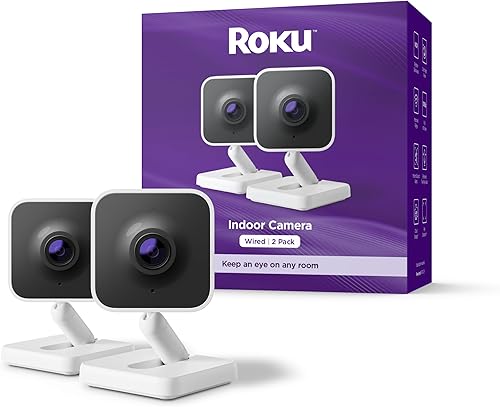
- 1080p HD color night vision
- 2-pack
- 120-degree field of view
- Motion and sound detection
- Roku TV and player viewing
The strongest match for Roku owners who want to pull up a live indoor camera feed on a Roku TV or player. The 2-pack also suits homes that need coverage in more than one room.
Pros
- Roku TV and player viewing
- 1080p color night vision
- Motion and sound alerts
- Two-way audio
- 2-pack
Cons
- Indoor use only
- Wired camera connection
- Screw-in installation
Its 120-degree field of view is useful for a broad room view from one position. The camera records at 1080p with a 20 frames-per-second frame rate, which gives the feed enough detail for routine indoor monitoring.
Who should choose the Roku Indoor Camera?
Choose it if you already use Roku TV or a Roku player and want camera viewing from the couch. The TV connection is the feature that most clearly separates it from the alternatives in this comparison.
It also suits homes that need sound alerts as well as motion alerts. A camera that can respond to both types of activity may be more useful in a room where a pet, child or unexpected noise matters.
Skip it if you need outdoor coverage, pan and tilt movement or a camera that can cover a large area by changing its viewing direction. The WYZE Cam Pan v3 is a better match for those needs.
For a broader overview of camera types, use this guide to which home security camera fits your room, connection and viewing habits.
How does Roku viewing work?
Roku’s main advantage is direct viewing on a Roku TV or player. The camera feed can be opened with a button on the remote or by using Roku Voice, so you do not have to rely on a phone for every quick check.
The camera also works with a smartphone through the Roku Smart Home mobile app. The app supports live streaming, camera setting changes and two-way talk, which gives you a second way to monitor the room.
This setup is especially useful when the television is already on. You can check a room during a show or use the feed when a motion or sound alert arrives.
TV viewing does not remove the need for careful placement. Put the camera where the view is useful, the power cable can reach safely and the lens does not point into a strong source of glare.
If you are comparing display options across brands, see whether an eufy security camera monitor screen setup fits your equipment. For a wired camera connection, this guide explains how to connect a wired security camera to a TV.
What does the Roku camera record at night?
The Roku Indoor Camera records 1080p full-color video with color night vision, and its light source is infrared. That combination is designed to keep indoor scenes visible after the room becomes dark.
Color night vision can help you distinguish objects and activity more easily than a black-and-white view. The result still depends on the room, camera angle and available light.
Place the camera so lamps, windows and reflective surfaces do not sit directly in the lens. A bright window can reduce detail in the rest of the room, while a nearby reflective surface can affect the image at night.
The 120-degree field of view also affects night monitoring. A wide view can cover more of a room, but it may make distant details smaller.
Mount or place the camera with the main area of interest reasonably close to the lens.
How do motion and sound alerts work?
The Roku Indoor Camera detects motion and sound, then sends an alert within seconds when its sensor detects activity. This gives it a broader alert role than a camera that only watches for movement.
Alerts can help you decide when to open the live feed. You can then use two-way audio through the Roku Smart Home mobile app to speak to a pet or someone in the room.
Keep the camera’s position in mind when judging alerts. A view that includes a busy walkway may create more activity than a view aimed at a quieter area.
Sound detection can also matter in a room where movement is limited. A pet may make noise outside the center of the frame, or a child may call out while staying mostly still.
The product data also identifies Alexa, Google Assistant and Roku Voice as controller options. Voice control can be useful when you want to bring up the camera feed without searching through an app.
Roku Indoor Camera versus Tapo C100
The Tapo 1080P Indoor Security Camera is the stronger alternative for detection and storage choices. It supports motion, person and baby crying detection, along with 30-foot night vision and cloud or microSD storage.
Tapo 1080P Indoor Security Camera: Best for flexible alerts

- 1080p video
- Motion and person detection
- Baby crying detection
- 30-foot night vision
- Cloud and microSD storage support
A practical alternative when detection choices, night vision distance and storage options matter more than direct Roku TV viewing. It works with Alexa and Google Assistant displays.
Pros
- Motion, person and baby crying detection
- 30-foot night vision
- Two-way audio and siren
- Alexa and Google Home support
- Cloud and microSD storage
Cons
- No direct Roku TV feature stated
- Wired camera connection
- 15 fps frame rate
Tapo records 1080p video and has a 110-degree field of view. Its frame rate is 15 frames per second, and it connects through Wi-Fi for wireless connectivity while using a wired power connection.
The camera supports two-way audio and includes a built-in siren. It works with Alexa and Google Home, and its feed can be viewed on an Echo Show or Google Chromecast with a screen.
Tapo’s product information supports microSD storage up to 512 GB or cloud storage. A microSD card is not included, so check compatibility before choosing a card.
The key difference is viewing priority. Roku is the natural choice if you want the camera on a Roku TV or player.
Tapo is the better fit if person alerts, baby crying detection, 30-foot night vision or storage flexibility leads your decision.
For more options, compare these best indoor security cameras by the type of room and monitoring task you have.
Roku Indoor Camera versus WYZE Cam Pan v3
The WYZE Cam Pan v3 is the better choice for moving coverage. It can pan 360 degrees, tilt 180 degrees and track movement, while the Roku camera keeps a fixed view from its placement.
WYZE Cam Pan v3: Best for moving coverage

- 360-degree pan
- 180-degree tilt
- 1080p video
- Color night vision
- Indoor and outdoor use
The best choice here for a room or covered area where a fixed view is not enough. Its pan, tilt, motion tracking and indoor/outdoor design add coverage flexibility, but it is not the direct Roku TV pick.
Pros
- 360-degree pan and 180-degree tilt
- Color night vision
- Motion tracking
- Indoor and outdoor use
- Privacy mode
Cons
- Outdoor power adapter required outdoors
- Not 5G compatible
- 15 fps or 20 fps frame rate
WYZE records 1080p video and provides color night vision. Its 120-degree field of view is similar to Roku’s stated field of view, but the pan and tilt movement let it inspect a much larger area.
The camera supports two-way talk, push notifications, a built-in siren and privacy mode. It also supports local or cloud storage, with microSD storage up to 512 GB identified in the product bullets.
WYZE is described for indoor and outdoor use and has an IP65 rating. Outdoor use requires an outdoor power adapter, and the camera is not 5G compatible.
Its compatibility is listed as Android 9.0 or newer and iOS 15.0 or newer. The frame rate is listed as 15 fps and 20 fps, while the Roku camera is listed at 20 frames per second.
Choose WYZE for a camera that can follow movement or cover a changing area. Choose Roku if the main goal is a fixed indoor view that you can open on a Roku TV or player.
The comparison is similar to choosing between a fixed camera and a moving camera. This guide to the best indoor wireless security camera can help if cable placement is your main concern.
What should you check before installing the Roku camera?
Check the outlet, viewing angle and mounting surface before installing the camera. The Roku Indoor Camera uses screw-in installation and includes a mounting screw, so placement should account for both the cable and the mounting point.
Measure the route from the camera to the power source. A Wi-Fi connection carries the camera data, but the camera still needs its wired power arrangement.
Aim the camera at the room area you want to monitor. Keep doors, windows and bright lights in mind, and avoid a position where people regularly block the view.
Use the 120-degree field of view to decide whether one camera covers the room. The 2-pack gives you another unit when one angle cannot cover the spaces you want to watch.
Do not place an indoor camera outside. If outdoor monitoring is part of your plan, the WYZE model is the only product in this comparison with indoor and outdoor usage identified.
Our guide to the best indoor security camera system may help if you want several cameras managed as a wider home setup.
What comes with the Roku Indoor Camera?
Each Roku Indoor Camera includes a USB charging cable, power adaptor and mounting screw. The product is white, uses Bluetooth and Wi-Fi, and supports wired and wireless connectivity technology.
The box does not change the basic installation decision. You still need to select a location with a useful view and a safe path to power.
Review the cable route before fixing the camera in place. Keep it away from areas where it could be pulled, pinched or become a trip hazard.
If you are choosing between fixed wired cameras and other designs, compare best wired indoor security cameras for placement ideas and trade-offs.
What are the main Roku Indoor Camera trade-offs?
The Roku Indoor Camera’s strongest benefit is the match between Roku hardware and indoor monitoring. Its TV viewing feature, mobile app, 1080p color night vision, two-way audio and motion and sound detection cover the needs of many living spaces.
Its limits are just as clear. It is for indoor use, has a fixed 120-degree view, uses screw-in installation and needs wired power.
Tapo adds person and baby crying detection, 30-foot night vision and storage choices. WYZE adds pan, tilt, motion tracking and outdoor use, but its outdoor setup needs an outdoor power adapter.
Scores on this page weigh the listed specs and features against the needs behind Roku indoor security camera reviews.
Final verdict for Roku indoor security camera reviews
Pick the Roku Indoor Camera if you want a 2-pack with 1080p color night vision and direct viewing on a Roku TV or player. Pick Tapo for detection and storage flexibility, or WYZE when pan, tilt and indoor/outdoor coverage matter more.
If you are also securing an entry point, this video doorbell E340 review covers a different camera use case. For rooms, pets and children inside the home, Roku’s TV-first design is the deciding feature.
Frequently asked questions
Is the Roku Indoor Camera good for Roku TV viewing?
The Roku Indoor Camera is the clearest choice here for Roku TV viewing because its camera feed can be pulled up on a Roku TV or player with a remote button or Roku Voice. It also works through the Roku Smart Home mobile app, so you can check live video from a phone.
Does the Roku Indoor Camera record at night?
Yes. The Roku Indoor Camera provides 1080p HD full-color picture with color night vision and uses infrared as its light source.
It is designed for indoor use, so place it where the camera has a useful view of the room without pointing directly at a bright window.
Is the Roku Indoor Camera wireless?
The Roku Indoor Camera uses Wi-Fi and Bluetooth for connectivity, but it is a wired camera for power. Its box includes a USB charging cable, power adaptor and mounting screw, and the installation type is screw-in.
Plan the outlet location before choosing the mounting spot.
Is the Roku Indoor Camera better than Tapo or WYZE?
Choose Roku for direct Roku TV or player viewing and a 2-pack. Choose Tapo if person detection, baby crying detection, 30-foot night vision or storage options are more important.
Choose WYZE if you need 360-degree pan, 180-degree tilt or indoor/outdoor coverage.


