Reolink Video Doorbell PoE Review: Worth It? (November 2026)
The Reolink Video Doorbell PoE suits a front door with Ethernet wiring and a plan for local recording. Check your network and storage setup first, then compare its wired approach with wireless doorbells if running cable is not practical.
On this page (8 sections)
- What stands out in the Reolink Video Doorbell PoE?
- How do local recording and visitor alerts fit the setup?
- What should you check before installing a wired doorbell?
- How does the Reolink compare with wireless alternatives?
- Does the Reolink doorbell need a separate chime?
- What are the main trade-offs of PoE?
- How we compared these options
- Is the Reolink Video Doorbell PoE right for you?
The Reolink Video Doorbell PoE is worth considering if you want a wired network connection at the front door and can install Ethernet there. Its PoE approach avoids relying on a wireless link for the doorbell’s network connection, while local recording and visitor alerts depend on choosing and configuring compatible Reolink equipment.
We compared the wired setup with alternatives for buyers who need a wireless option or a separate indoor chime. The main decision is whether a permanent cable route and your preferred recording setup suit your home.
What stands out in the Reolink Video Doorbell PoE?
The Reolink Video Doorbell PoE is designed for wired networking, which can suit a front door near an Ethernet cable route. Its value depends on the rest of your setup: confirm power, storage and alert handling before you commit to installation.
REOLINK Chime Plus: Best for compatible Reolink alerts
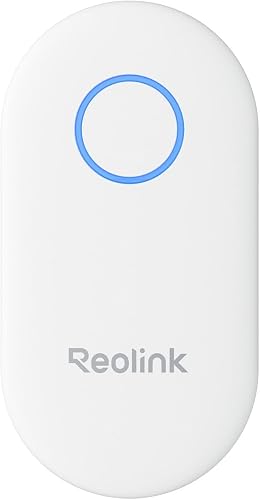
A plug-in chime for compatible Reolink doorbells, with adjustable volume, ringtone and light settings in the Reolink App.
Pros
- Supports up to 5 chimes with a compatible doorbell
- Offers up to 10 melodies and 5 volume levels
- App controls volume, ringtones and lights
Cons
- Works only with specified Reolink doorbells
- Does not replace the doorbell camera
A PoE doorbell is a different fit from a wireless camera that connects through home Wi-Fi. If you are still choosing the camera type for your home, start with this guide to which home security camera fits your placement and network needs.
Who should consider a Reolink video doorbell?
Consider the Reolink model if you can route Ethernet to the door and prefer a fixed network connection. The same cable route may make the installation harder if the entry is far from an accessible network point or crossing finished walls would be disruptive.
PoE describes how a device can receive power through an Ethernet connection, but the exact wiring and compatible equipment matter. Review the current Reolink installation instructions and verify what your chosen doorbell version requires.
The broader guide to video doorbell PoE explains what to check about network hardware, cabling and placement before choosing a model.
How do local recording and visitor alerts fit the setup?
Local recording can keep footage on compatible equipment at home, while visitor alerts tell you when someone presses the button or triggers a supported event. Check the recording destination and alert options for the exact Reolink doorbell version you plan to install.
Do not assume that “local recording” means every setup stores the same amount or retains clips for the same period. Confirm the supported storage device, capacity and playback method, then decide whether that arrangement covers your needs.
A wired network connection also does not guarantee that alerts will arrive in every situation. App settings, notification permissions and the network path to your phone still affect whether you see an alert while away.
If you want a chime inside the home, REOLINK Chime Plus can ring for a visitor press or motion event when paired with a compatible Reolink doorbell. Its compatibility is limited to specified Reolink models, including Video Doorbell PoE/WiFi V2 or higher versions.
What should you check before installing a wired doorbell?
Check the cable route, doorbell position and existing wiring before buying a PoE model. A clean installation depends on having a workable route from the camera to your network equipment.
Sketch the route from the door to the network connection and note walls, trim and exterior entry points. Keep the cable protected from weather and physical damage, and follow the installation instructions for the doorbell and network hardware.
Think about the camera’s view as well as the cable. The mounting position should show visitors and delivery areas while avoiding views into neighboring private spaces.
If you prefer a conventional wired model, compare the options in our guide to the best video doorbell hardwired. If a doorbell cannot be mounted in your preferred spot, best video doorbell holders covers holder options that may help with placement.
How does the Reolink compare with wireless alternatives?
The Reolink PoE model is the clearest fit when Ethernet installation is practical; wireless models suit doors where running cable is difficult. The alternatives below offer different power and storage arrangements, so compare the connection type with your installation limits.
aosu 5MP Ultra HD Wireless & Wired: Best for flexible power and local storage

A Wi-Fi doorbell that can use battery or wired power and includes an 8GB base with loop recording, giving you a different setup from a PoE model.
Pros
- Includes 8GB local storage with 60-day loop recording
- Offers battery or wired power
- Supports 2.4 GHz and 5 GHz Wi-Fi
Cons
- Uses Wi-Fi rather than PoE networking
- Battery operation needs charging
The aosu 5MP Ultra HD Wireless & Wired supports Wi-Fi and offers either battery or wired power. Its included aosuBase Mini has 8GB of storage and supports 60-day loop recording, giving buyers an explicit local-storage detail to compare with their intended Reolink setup.
BOIFUN Video Doorbell Camera Wireless: Best for wire-free installation
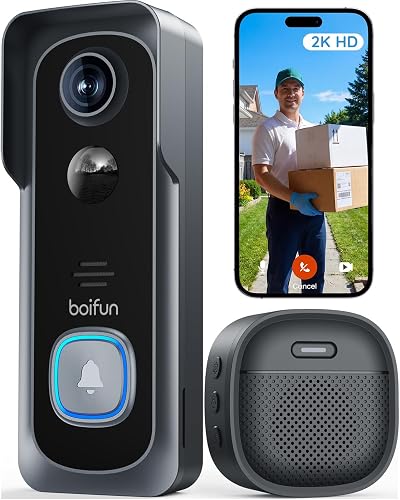
A battery-powered option with two-way audio, motion alerts and local microSD storage support, for buyers who want to avoid doorbell wiring.
Pros
- No subscription required for core features
- Supports microSD cards up to 128GB
- Includes two-way audio and night vision
Cons
- Works only with 2.4 GHz Wi-Fi
- MicroSD card is not included
The BOIFUN Video Doorbell Camera Wireless uses 2.4 GHz Wi-Fi and a built-in rechargeable battery. It supports local storage on a microSD card up to 128GB, but the card is not included.
Choose among these based on the installation you can support. Ethernet favors a fixed wired network path, aosu combines Wi-Fi with flexible power and included local storage, and BOIFUN avoids doorbell wiring but relies on 2.4 GHz Wi-Fi and a rechargeable battery.
Does the Reolink doorbell need a separate chime?
A separate chime is useful if you want an audible alert inside the home without relying only on a phone notification. REOLINK Chime Plus is an option for compatible Reolink doorbells, with app controls for ringtone, volume and light settings.
The chime supports up to 10 melodies and 5 volume levels. Reolink says you can connect up to 5 chimes to a compatible doorbell, which may help in a larger home.
Check the exact doorbell version before adding it. For battery details, see V5 doorbell battery information.
Chime Plus is designed for Reolink Video Doorbell PoE/WiFi V2 or higher and Reolink Battery Video Doorbell 2nd Gen, and it does not support third-party products or other Reolink devices.
For other indoor alert styles, compare our guide to the best video doorbell with chime. Your choice should account for where people are in the home and whether phone alerts alone are enough.
What are the main trade-offs of PoE?
PoE offers a wired network connection, but it requires a cable path to the camera. Installation can take more planning than placing a wireless doorbell where Wi-Fi reaches.
A wired connection may reduce reliance on the strength of a Wi-Fi signal at the door. It does not remove the need to check network compatibility, configure alerts or plan how footage will be stored.
Local recording can reduce dependence on cloud storage for footage, depending on the system configuration. Verify the supported storage and retention details rather than assuming a particular number of days or a specific storage device.
If you cannot run Ethernet, a Wi-Fi camera may be a better fit. Our guide to a Blink outdoor camera without a subscription covers a different camera setup, while Wyze Cam use through a window explains a placement constraint that can affect indoor cameras.
How we compared these options
Our score weighs specs, features and buyer feedback against what you’re shopping for. For this review, the main factors are connection type, recording approach, power needs and whether an indoor chime is part of the setup.
The Reolink Chime Plus scores highest here because it is a direct accessory match for compatible Reolink video doorbells and offers adjustable alert settings. The aosu model scores well for buyers who want flexible power and specified built-in local storage, while BOIFUN fits a wire-free installation with microSD support.
These products are alternatives and accessories, not direct substitutes in every setup. Match the doorbell and chime to your home’s wiring and the exact Reolink version you plan to use.
Is the Reolink Video Doorbell PoE right for you?
Choose the Reolink Video Doorbell PoE if you can run Ethernet to the door and want a wired network path with a local recording plan. Choose the aosu option if battery or wired power and included local storage better fit your installation, or BOIFUN if you need a wire-free doorbell and can use 2.4 GHz Wi-Fi.
Before you buy, confirm the Reolink model version, compatible recording equipment and whether you want an indoor chime. For a broader comparison of camera formats, see our guide to the best 4K wireless outdoor security camera.
Frequently asked questions
Is the Reolink Video Doorbell PoE a good choice?
The Reolink Video Doorbell PoE is a good fit if you want a wired network connection and can run Ethernet to the door. Before choosing it, confirm the cable route, power and recording setup you plan to use; a Wi-Fi or battery model may be easier if wiring is not practical.
Does a PoE video doorbell need Wi-Fi?
A PoE doorbell uses Ethernet for its network connection, so Wi-Fi is not the defining link. You still need a compatible network and a way to view alerts and footage, so check Reolink's current setup guidance for the exact equipment and app requirements.
Can Reolink record video locally?
Reolink's doorbell setup can support local recording, but the storage method and capacity depend on the compatible equipment you choose. Confirm where footage will be saved, how long it will be retained and how you'll access it before installing the camera.
Will REOLINK Chime Plus work with this doorbell?
REOLINK Chime Plus is compatible with Reolink Video Doorbell PoE/WiFi V2 or higher versions and Reolink Battery Video Doorbell 2nd Gen. Confirm your doorbell version before buying, since the chime does not work with other Reolink devices or third-party products.


