9 Best Solar Security Cameras (November 2026)
The best solar security cameras include the Gianteye 2K Security Camera System for flexible four-camera coverage, the SEHMUA 2K Solar Security Cameras Wireless Outdoor for two-camera pan and tilt, and the eufy Security SoloCam S340 for dual-lens viewing.
On this page (7 sections)
- How we chose the best solar security cameras
- The best solar security cameras for different setups
- How much sunlight does a solar security camera need?
- Do solar security cameras need a subscription?
- What should you check before mounting a solar camera?
- Are solar cameras compatible with Ring or a monitor?
- Which solar security camera should you choose?
The Gianteye 2K Security Camera System is our top pick for a multi-camera setup with dual-band Wi-Fi, pan and tilt, and flexible storage. For a single camera, the eufy SoloCam S340 pairs dual-lens viewing with built-in storage, while the eufyCam C37 allows separate placement of its solar panel.
A solar panel can reduce how often you recharge a camera, but it does not make placement irrelevant. The panel needs useful sunlight, and the camera still needs a clear view, a reliable connection and a recording plan that fits your needs.
For a battery-powered outdoor camera without an integrated solar panel, see the Blink Outdoor 4 review.
If you’re still deciding what features matter, start with our guide to choosing which home security camera. For a multi-camera setup, compare these picks with our best solar security camera system options.
Our picks at a glance
-
1
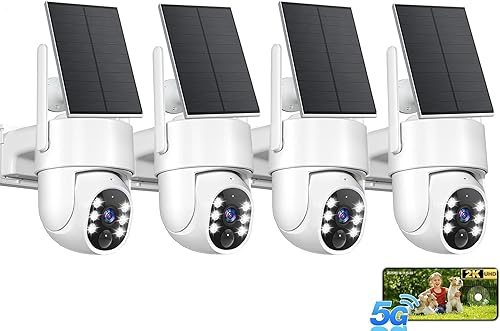 Best for flexible four-camera coverage
Gianteye 2K Security Camera System
9.7/10 our score
See it on Amazon -
2
 Best for two-camera pan and tilt
SEHMUA 2K Solar Security Cameras Wireless Outdoor
9.6/10 our score
See it on Amazon -
3

- 4
 Best for flexible panel placementCheck it
- 5
 Best for four-camera local storageCheck it
- 6
 Check it
aosu 2K Solar Security Cameras Wireless Outdoor
Best for an expandable aosu system - 7
 Check it
AlkiVision Solar Security Cameras Wireless Outdoor
Best for SD or optional cloud storage - 8
 Check it
GALAYOU Solar Camera Outdoor Wireless for Home
Best for a separate panel mount - 9
 Best for pan and tilt with local storageCheck it
How we chose the best solar security cameras
The best solar security cameras pair a useful camera view with a practical way to keep the battery charged and save footage. We compared the features and storage options provided for each model, including panel placement, Wi-Fi, recording limits and whether local storage requires a separate card.
A detachable panel can help when the camera needs to face a shaded doorway but the panel can reach a sunnier wall or roof edge. An integrated panel reduces separate mounting work, though the camera position then needs to serve both the view and the panel’s access to sunlight.
We also considered how each camera handles a larger property. Pan and tilt can cover more directions from one mounting point, while a multi-camera kit can watch separate entrances without relying on one camera’s movement.
Our score weighs specs, features and buyer feedback against what you’re shopping for.
| Product | Best for | Resolution | Wi-Fi | Storage | Our score |
|---|---|---|---|---|---|
| Gianteye 2K Security Camera System | flexible four-camera coverage | 2K | 2.4GHz and 5GHz | Optional MicroSD card or cloud | 9.7 |
| SEHMUA 2K Solar Security Cameras Wireless Outdoor | two-camera pan and tilt | 2K | 2.4GHz only | MicroSD up to 128GB or optional cloud | 9.6 |
| eufy Security SoloCam S340 | dual-lens viewing | 3K | Built-in 8GB | 9.5 | |
| eufy Security eufyCam C37 | flexible panel placement | 2K | 2.4GHz only | MicroSD up to 256GB or compatible HomeBase | 9.4 |
| aosu D1 Classic 4-Cam Kit | four-camera local storage | 2K (3MP) | 32GB aosuBase | 9.3 | |
| aosu 2K Solar Security Cameras Wireless Outdoor | an expandable aosu system | 2K | 32GB included; expandable up to 1TB | 9.2 | |
| AlkiVision Solar Security Cameras Wireless Outdoor | SD or optional cloud storage | 2K | 2.4GHz only | MicroSD up to 128GB or optional cloud | 9.0 |
| GALAYOU Solar Camera Outdoor Wireless for Home | a separate panel mount | 2K | 2.4GHz only | MicroSD up to 128GB or paid cloud | 8.6 |
| WYZE Solar Cam Pan | pan and tilt with local storage | 2K | 2.4GHz only | MicroSD up to 512GB or optional cloud | 8.5 |
The best solar security cameras for different setups
The right pick depends on how many areas you need to monitor, where sunlight is available and how you want to store recordings. For options beyond solar models, compare outdoor security cameras.
These nine options range from single cameras to multi-camera kits.
Gianteye 2K Security Camera System: Best for flexible four-camera coverage
- Four cameras
- 2K resolution
- Pan, tilt and zoom
- 2.4GHz and 5GHz Wi-Fi
- Optional MicroSD or cloud storage
A four-camera set with pan, tilt and zoom, dual-band Wi-Fi, and a choice of local or optional cloud storage. The MicroSD card is not included.
Pros
- Four cameras in the set
- Supports both 2.4GHz and 5GHz Wi-Fi
- Local or optional cloud storage
Cons
- MicroSD card is sold separately
- Solar output depends on available sunlight
Gianteye suits a home that needs several viewing points and has a strong Wi-Fi signal at each camera location. The four-camera system supports both 2.4GHz and 5GHz Wi-Fi, which gives you more flexibility than cameras limited to one band.
Each camera offers pan, tilt and zoom through the app, plus 2K color night vision with a motion-triggered spotlight. Gianteye says 2 hours of daily sunlight can maintain 24/7 operation, but the panel’s real charging contribution depends on sun exposure and camera activity.
Storage can be local or cloud-based. A MicroSD card is not included, and cloud storage is optional, so decide which route you want before setup.
Choose it when you want several cameras and mixed-band Wi-Fi support. The Gianteye solar system guide compares system-level options if you’re choosing a base and multiple cameras together.
SEHMUA 2K Solar Security Cameras Wireless Outdoor: Best for two-camera pan and tilt
- Two cameras
- 2K resolution
- 360° pan and tilt
- 2.4GHz Wi-Fi
- MicroSD slot up to 128GB
The two-camera set combines pan and tilt with a removable solar panel for each camera. It supports 2.4GHz Wi-Fi and has a MicroSD slot for local storage.
Pros
- Two cameras included
- Pan and tilt viewing
- Local MicroSD storage supported
Cons
- Does not support 5GHz Wi-Fi
- MicroSD cards are sold separately
SEHMUA is a fit for a two-camera setup where you want pan and tilt at both viewing points. Its removable panels offer some freedom to place cameras for coverage and panels where they can receive sunlight.
Each camera supports 2K video, two-way audio and motion alerts. The system works on 2.4GHz Wi-Fi only, so check your router and the signal at the planned mounting locations before you buy.
For storage, the cameras accept MicroSD cards up to 128GB, sold separately, or optional cloud storage. If you want a closer look at this brand’s choices, see our aosu solar camera reviews; for a related brand-specific comparison, read our best eufy solar security cameras.
eufy Security SoloCam S340: Best for dual-lens viewing
- 3K dual-lens camera
- 8× zoom
- 360° pan and tilt
- Removable solar panel
- Built-in 8GB storage
The dual-lens camera pairs 3K resolution and 8× zoom with pan and tilt. It has built-in 8GB storage and a removable solar panel.
Pros
- Dual-lens viewing with 8× zoom
- Built-in 8GB storage
- No monthly fee
Cons
- Does not support 24/7 recording
- Solar charging varies with weather and sunlight
The SoloCam S340 suits a spot where zoom and wide-area movement are both useful. Its dual-lens camera combines 3K resolution with 8× zoom, and it can pan and tilt through a 360° view when installed vertically.
Compare Eufy with Ring in our Eufy vs Ring camera guide.
The removable solar panel gives you a choice of mounting positions. eufy says the battery can run for up to 3 months based on 300 seconds of recording per day, but it also notes that solar charging depends on weather and available sunlight.
The camera includes 8GB of local storage and does not require a monthly fee. It does not support 24/7 recording, so choose it for motion-based monitoring rather than continuous capture.
eufy Security eufyCam C37: Best for flexible panel placement
- 2K resolution
- Detachable solar panel
- 360° pan and tilt with AI tracking
- MicroSD up to 256GB supported
- No cloud storage
A detachable panel lets you choose camera and panel positions separately. The camera supports local MicroSD storage, but it has no built-in storage and does not support cloud storage.
Pros
- Panel can be positioned separately
- 360° pan and tilt with AI tracking
- No monthly fees
Cons
- MicroSD card sold separately
- Does not support 24/7 recording
The eufyCam C37 suits a mounting spot where the camera’s view and the panel’s sunlight are in different directions. Its detachable solar panel can be mounted separately, so the camera can point toward the activity while the panel faces a brighter area.
It offers 2K video, pan and tilt with AI tracking, and color night vision with a spotlight. The camera has no built-in storage; add a MicroSD card up to 256GB or use a compatible HomeBase for storage.
Cloud storage is not supported, and continuous 24/7 recording is not available. For a closer comparison with other models from the brand, see our solar eufy camera guide.
aosu D1 Classic 4-Cam Kit: Best for four-camera local storage
- Four cameras
- 32GB local storage
- 2K resolution
- 360° pan and tilt
- Multi-camera live view in the app
This four-camera kit includes an aosuBase with 32GB of local storage and event-based recording. Cameras connect to the base, which connects to your router by Ethernet.
Pros
- 32GB local storage included
- Four live feeds can appear in the app
- No subscription required
Cons
- Base does not support HDMI or TV output
- Cameras are designed to work with the included base
The aosu D1 Classic kit fits a home that needs four camera views in one app and wants local storage included. Its base comes with 32GB of storage and records events, with no subscription required.
The cameras have integrated solar panels, pan and tilt, and 2K video with full-color night vision. The base connects to your router with Ethernet; the cameras connect wirelessly to the base rather than directly to home Wi-Fi.
The app can show up to four live feeds at once, but the base does not output video to a TV or monitor over HDMI. If you want a brand-specific overview, our aosu solar security camera reviews cover more options.
aosu 2K Solar Security Cameras Wireless Outdoor: Best for an expandable aosu system
- Six-camera kit
- Detachable solar panels
- 32GB aosuBase storage
- Expandable storage up to 1TB
- 2K resolution
The six-camera kit uses aosuBase for local storage and camera management. Its split solar panels can be mounted away from the cameras to reach better sunlight.
Pros
- Six-camera kit
- 32GB local storage included
- Storage can expand up to 1TB
Cons
- Expansion card is sold separately
- Recording is event-based
This aosu six-camera kit is for larger properties or households that want room to expand. Its split solar panel design lets you mount each panel where sunlight is better while pointing the camera toward the area you want to monitor.
The aosuBase includes 32GB of local storage, and you can expand it up to 1TB with a separately purchased MicroSD card. The base connects to the router by Ethernet, while the cameras use a dedicated wireless connection to the base.
The system records motion events rather than continuous video. It can show up to four camera feeds in the app at once, which may help when you want to check several areas together.
AlkiVision Solar Security Cameras Wireless Outdoor: Best for SD or optional cloud storage
- 2K resolution
- 360° view
- IP67 water resistance
- MicroSD up to 128GB
- Optional cloud storage
This camera supports motion-triggered recording to a MicroSD card or optional cloud storage. Advanced AI recognition and some cloud features require a subscription.
Pros
- MicroSD storage supported
- IP67 water resistance
- Two-way audio and siren
Cons
- MicroSD card sold separately
- Some AI and cloud features require a subscription
AlkiVision suits buyers who want a single camera with MicroSD storage and the option of cloud service. It supports a card up to 128GB and motion-triggered recording, while some cloud features and advanced AI recognition require a subscription.
It offers 2K video, 360° view, two-way audio, a siren and IP67 water resistance. The camera uses 2.4GHz Wi-Fi, so confirm that your router reaches the intended mounting point.
The maker says the camera can record up to 20 seconds of video after motion detection. Treat charging and recording time as dependent on the camera’s settings, activity and available sunlight.
GALAYOU Solar Camera Outdoor Wireless for Home: Best for a separate panel mount
- 2K resolution
- 344° horizontal pan and 85° tilt
- 2.4GHz Wi-Fi
- MicroSD up to 128GB
- Solar panel can mount separately
The solar panel can attach to the camera or mount separately, which can help when the best camera view and strongest sunlight are in different spots. It supports local MicroSD storage.
Pros
- Panel can mount separately
- Pan and tilt with motion tracking
- MicroSD storage supported
Cons
- Does not support 5GHz Wi-Fi
- No continuous recording
GALAYOU is a practical option when the camera and panel need different mounting positions. You can attach the panel to the camera or install it separately, which helps you aim the camera at an entry while seeking better sunlight for charging.
It supports 2K video, pan and tilt, two-way audio, and 2.4GHz Wi-Fi. Local recording requires a MicroSD card up to 128GB; paid cloud service is another option.
The camera records motion events rather than continuously, and it does not support 5GHz Wi-Fi. Check that the router’s 2.4GHz signal reaches the camera before fixing the mount in place.
WYZE Solar Cam Pan: Best for pan and tilt with local storage
- 2K resolution
- 360° pan and 70° tilt
- AI person tracking
- MicroSD up to 512GB
- 2.4GHz Wi-Fi
This solar camera combines pan and tilt with person tracking, a spotlight, and a siren. Local MicroSD storage is available, while cloud recording and advanced alerts are optional paid services.
Pros
- MicroSD storage up to 512GB
- Pan, tilt and person tracking
- Two-way talk
Cons
- Does not support 5GHz Wi-Fi
- Cloud recording and advanced alerts require optional subscriptions
WYZE Solar Cam Pan suits a single mounting spot where you want a movable view and local storage. For another Wyze outdoor model, see our Wyze Bulb Cam review.
It offers 360° pan and 70° tilt, AI person tracking, 2K video and a motion-activated spotlight.
The camera supports a MicroSD card up to 512GB, sold separately. Cloud video recording and advanced alerts are available through optional subscriptions, and the camera works on 2.4GHz Wi-Fi rather than 5GHz.
WYZE says 1 hour of sunlight daily can eliminate charging downtime, but actual charging varies with the panel’s exposure and use. Update the Wyze app before setup, as the maker advises.
How much sunlight does a solar security camera need?
Solar cameras need a panel position that receives enough direct sunlight to offset the battery used by recording and alerts. The amount varies by camera, weather, season, shade and how often the camera captures activity.
Several brands give daily sunlight estimates, but those should be treated as maker guidance rather than a guarantee for every home. A covered porch or north-facing wall may get too little direct sun, even if the camera itself has a clear view.
A detachable panel gives you more choice. The eufyCam C37 and aosu six-camera kit let you position the camera and panel separately, while an integrated panel keeps the setup simpler when both can face the right direction.
Before mounting, check the sun at the panel spot during different parts of the day. Keep the panel clear of branches, roof overhangs and seasonal shade, and allow access so you can wipe away dust or leaves.
Do solar security cameras need a subscription?
No, several solar cameras in this roundup support local storage without a required subscription. The eufy SoloCam S340 has built-in 8GB storage, while the aosu D1 Classic includes a base with 32GB.
Other cameras need a separate MicroSD card for local recordings. Check the maximum supported card size and whether the camera records to the card without a paid plan, since cloud storage and advanced AI alerts may have separate fees.
AlkiVision’s cloud service is optional, but some AI recognition and cloud features require a subscription. WYZE also offers optional subscriptions for cloud recording and advanced alerts, while local MicroSD storage is available separately.
If avoiding ongoing fees is your main goal, compare our guide to the best solar security cameras without a subscription. To focus on card-based recording, see solar security cameras with SD cards.
What should you check before mounting a solar camera?
Check the camera’s Wi-Fi band, panel exposure, viewing angle and storage plan before drilling. A camera that fits your feature list can still be a poor choice if it cannot connect reliably or its panel stays shaded.
Most models here use 2.4GHz Wi-Fi, but Gianteye also supports 5GHz. Some kits use a base connected to the router by Ethernet, so plan a spot for the base as well as camera mounts.
Decide whether one camera can cover the area or whether separate views are better. Pan and tilt can follow activity, but multiple fixed views may suit separate doors or sides of a building.
Then confirm how you will review footage. A camera may save clips to a MicroSD card, a home base or optional cloud service, and some features depend on a compatible base or paid plan.
For brand-specific options, compare Reolink solar security cameras and Tapo solar security cameras. If you’re deciding between wireless network choices, our Wi-Fi solar camera guide explains what to check.
Are solar cameras compatible with Ring or a monitor?
Compatibility depends on the camera brand and the system you already use. A solar panel made for one camera does not automatically work with a different brand or model.
If you’re considering Ring, check which camera models support its solar accessories and whether the panel is sold for that exact model. Our guide to a Ring solar security camera covers the model compatibility question.
Most cameras in this roundup use a phone app for live view. The aosu D1 Classic app can show four feeds, but its base does not provide HDMI or TV output, so it is not a direct monitor-based setup.
For a system built around a screen, read our guide to a solar security camera system with a monitor. Also see our solar 4K camera guide if image resolution is your main priority, or our solar cameras with lights for built-in deterrence features.
Which solar security camera should you choose?
Choose the Gianteye 2K Security Camera System if you want four cameras, pan and tilt, and support for both 2.4GHz and 5GHz Wi-Fi. Pick the eufy SoloCam S340 for dual-lens viewing and built-in storage, or the aosu D1 Classic for a four-camera kit with local storage included.
If panel placement is your biggest concern, choose a camera with a detachable panel such as the eufyCam C37 or aosu six-camera kit. Before buying, confirm that sunlight, Wi-Fi and the storage plan suit each camera location.
For more options from a familiar camera brand, compare Blink outdoor camera power options and learn about Blink cameras without a subscription.
Our top 3 picks at a glance
-
1
Best for flexible four-camera coverage
Gianteye 2K Security Camera System
9.7/10 our score
See it on Amazon -
2
Best for two-camera pan and tilt
SEHMUA 2K Solar Security Cameras Wireless Outdoor
9.6/10 our score
See it on Amazon -
3
Frequently asked questions
Do solar security cameras work on cloudy days?
They can keep running from their batteries when sunlight is limited, but charging may not keep pace with use. eufy says the SoloCam S340 battery can run for up to 3 months, while its solar charging depends on weather and available sunlight.
Shade, winter days, camera activity and panel angle can all affect charging.
Do solar security cameras record all the time?
Most battery-powered cameras in this roundup record events instead of continuous video. The eufy SoloCam S340 and eufyCam C37 do not support 24/7 recording.
If you need continuous recording, check the recording mode before choosing a battery camera and consider whether a wired system is a better fit.
Can I place the solar panel away from the camera?
Some cameras have detachable panels that can mount separately from the camera. The eufyCam C37 and aosu 2K system offer this flexibility, which can help when the best view is shaded but a nearby spot gets more sun.
Check panel cable reach and mounting options before you choose a location.
Do solar cameras need Wi-Fi?
The cameras here use Wi-Fi or a base connected to your router to provide app access and alerts. Several models support only 2.4GHz Wi-Fi, while the Gianteye system supports both 2.4GHz and 5GHz.
Check the camera's band support and signal strength at each mounting spot.


